

2月22日的Angle Meter应用程序分析
Angle Meter
- Smart Tool Factory
- Google Play 商店
- 免费
- 工具
Angle Meter
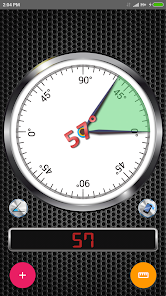
The Angle Meter application is a tool for measuring angle or inclination. It uses arc tangent of gravity between two axes and provide accurate results depending on quality of sensors.
Features
• Option to measure angle or slope on surfaces not parallel to ground with relative angle mode.
• Interval of 0-180 or 0-360 degrees with angle complement.
• 2 orientation axes.(Move your device left/right or back/forward direction)
• Option to save recordings in the database, view them as lists or charts, and get a copy of the measurement history (as xls files or charts).
• Option to measure the angle of an object in picture through image measurement screen.
• Image gallery to display images in preview mode or with details.
• Various customization options.
Instructions
💡 - User Manual and Privacy Policy is available in Help Section of navigation view.
⚠️ - To open navigation view please swipe your screen to the right near the left side of the screen.
⚙ - For customization options please visit Settings Screen.
📧 - If you need more details about how to use this app or you have suggestion to make this app better feel free to email us any time.
🛠🛠🛠Measurement Modes🛠🛠🛠
Single Angle: Rotate your device and read the angle.
Difference Between Two Angles: This mode is useful for calculating inclination between 2 separate objects. Touch angle meter bezel and fix the first angle. Touch again to fix second and see difference between to angles.
Relative Angle: This mode is useful for measuring angle if object is not parallel to the ground or surface is not even. Touch angle meter bezel to set first portion of the angle, touch again after rotating your device to complete measurement.
Bubble Level: Put your device on the floor and measure the ground angle horizontally and vertically.
Customer Satisfaction and Feedback
⚠️IMPORTANT: If you find a bug using the application, PLEASE write to smarttoolfactory@icloud.com with your phone model name and the description of the problem, before writing a negative comment.
🤝 ✅ 👍 Customer satisfaction is our priority, and we will do our best to fix the issues as soon as possible! Thank you for choosing this app.
Angle Meter 使用排名
使用率排名基于 Similarweb 的算法,该算法会计算 28 天内的当前安装量和活跃用户数。
所有品类在
巴西--
工具在
巴西#1,963
用户兴趣点和热门类别
Angle Meter 用户使用的热门类别和应用程序




















 Angle Meter VS.
 二月 22, 2026