

4月16日的Millimeter Pro - screen ruler应用程序分析

Millimeter Pro - screen ruler
- vistech.projects
- Google Play 商店
- 付费
- 生产力
Millimeter is a screen ruler app. It uses the full screen of Android devices for distance and length measurements as a caliper or tape measure. Place an object on the scale paper screen and simply touch and move rulers to measure it. Check features for more details. Pro version measures area, circle, radius and diameter, angle, ratio, and splits into equal parts.
NO POP-UP ADS on your screen in the app unlike other free ruler apps on market. The best and real full-screen ruler.
☛ ANY DEVICE can be calibrated for accurate measurements in Calibration Mode, where common standard objects (coins, credit cards, etc) can be used as a reference.
More about the app: goo.gl/aF9L9Q
Posts about the app: http://goo.gl/304nJB
📏 What you can do in Pro version:
- Calibrate Millimeter with custom or standard objects (💳)
- Ruler Mode for measure in metric and imperial units: mm and inch
- Use fractions for inch units
- Use the app as a standard ruler
- Use full-screen mode for better user experience in Ruler mode
- Additional vertical ruler for 2D measurements (📐)
- Area measurement for 2D measurements (⬛)
- Calculate the W/H ratio of the rectangular objects in 2D
- Parts Mode to split length into equal parts
- Thread per inch ( TPI ) measurement pattern (🔩) in Parts mode (https://youtu.be/M1Qrbs2bgCY)
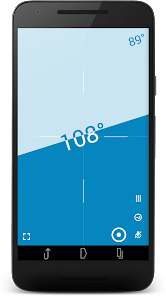
- Spirit/bubble level for checking incline or tilt angle 🔮
- Circle Mode to measure circular objects (🔴)
- Split circle into equal sectors
- Protractor / Goniometer Mode to measure angles (⚪)
- Lock / Unlock rulers in any mode for better usability (🔒)
- Set exact size, length, diameter, number of parts manually with keyboard input (⌨)
- Change background to BW night mode for power saving (🔋) and better visualization (🌓)
- turn on/of the fine grid (1 mm for millimeter units)
- Read interactive Help / Guide about all available features in a mode
Use this screen ruler in different projects where you need to measure small objects that fit your screen: jewelry, rings 💍, screws and bolts, buttons and beads, nuts and washers, knitting pattern, insects, hooks, thread, etc.
Units: millimeter (mm), inch (in). Fractions are supported for inch units.
Supported languages:
- English, German, Russian, Japanese, and French.
☎ If you have any problems with the app on your device, please contact support@vistechprojects.com first and we will help you. Thank you.
VisTech.Projects Team.
Note:
measurement range limited by the size of your screen and with fine calibration, the app gives you accuracy comparable to a standard ruler or measure tape.
Millimeter Pro - screen ruler 使用排名
使用率排名基于 Similarweb 的算法,该算法会计算 28 天内的当前安装量和活跃用户数。
所有品类在
美国#552
生产力在
美国#67


 Millimeter Pro - screen ruler VS.
 四月 16, 2026