

4月24日的Ghostalker应用程序分析

Ghostalker
- WorldByDesign.com
- Google Play 商店
- 付费
- 生活方式
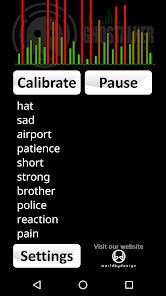
Whether you are a professional Paranormal Investigator, a hobbyist or just want to have some fun, this app works like a "Spirit Box" which converts energy into spoken words.
INSTRUCTIONS: Do NOT hold your device and do NOT tap or shake your device while running Ghostalker. It is designed to detect the smallest of movements and vibration, as well as many other sensor readings.
With a database of over a thousand commonly used words, Ghostalker will use all of the sensors it can find in your device to pick up changes in energy. This includes sensors for the tiniest amount of vibration, rotation, GPS, gyroscope, light, magnetic fields, proximity etc. and convert them to words which it will display and speak. This app uses the actual raw data from the sensors to determine what to say, rather than picking words at random like some other apps.
LOGGING: This is the full version of the app so it logs the words spoken for you to view, save, email, delete etc. at a later time. There is also a built-in log viewer. The date and time is logged, along with the combined change in sensor readings (so you can see how much energy was picked up) and the word. The log files are in CSV format so you can import them into your favourite spreadsheet (e.g. MS Excel or Google Sheets).
DICTIONARY: You can also manage your own custom dictionary of up to 10,000 words so you can make your own special list of replies. You can flick between the in-built dictionary, your own custom dictionary or both combined (from v0.5) at any time.
SENSORS: Occasionally interference can cause individual sensors to trigger constantly. This can also be caused by faulty or overly sensitive sensors. From v0.2 you can enable and disable individual sensors to prevent such issues.
This app is not designed to form complete sentences so it is up to you to interpret what it says in your own way. Top end phones and tablets tend to have more sensors than low end ones but the app is designed to work with whatever it can find. The sensitivity of sensors will also vary between devices.
TIP 1: Using the custom dictionary you can have it reply with special limited words, for example 'yes', 'no' and 'maybe' when you ask it questions. Or add a series of digits and get the spirits to pick your lottery numbers. Or add the letters of the alphabet so it can work like a Ouija board.
TIP 2: Paranormal investigators believe that leaving such devices running for as long as possible will allow spirits to learn what energy is required to trigger certain words.
TIP 3: If it starts to trigger words constantly you may be getting interference from something close by. Try moving the device somewhere else or tap the 'Calibrate' button to get it to tune out background variance (although you will lose some sensitivity). If it persists you can click on 'Sensors' under 'Settings' to see which sensor is triggering and disable/enable it.
TIP4: NEW - Keep word lists in text files (each word on a new line or separated with a space) or find them on the web etc. to copy to your clipboard. Then paste them into Ghostalker's custom word list. You can also copy the word list from Ghostalker into your clipboard to save in your favourite text editor. Some free word lists are available on our website:
https://www.worldbydesign.com/app/ghostalker/
If the app does not do what you were expecting, or there is an issue with it running on your device, please contact me for help.
There are no adverts in this software and it does NOT require an internet connection so you can use it in remote locations. If you would like to try the free version first (without logging or a custom dictionary function), it is listed under "Ghostalker Lite".
Ghostalker 使用排名
使用率排名基于 Similarweb 的算法,该算法会计算 28 天内的当前安装量和活跃用户数。
所有品类在
美国#763
生活方式在
美国#32


 Ghostalker VS.
 四月 24, 2026