

4月17日的WeFocus: Focus, Pomodoro Timer应用程序分析

WeFocus: Focus, Pomodoro Timer
- Notes Notepad Notebook
- Google Play 商店
- 免费
- 生产力
WeFocus is a pomodoro timer tool. It helps you stay focused by doing one thing at a time. With WeFocus, you can get things done easily.
Does this scenario sound familiar to you? You need to prepare a quotation proposal for the client by the end of the day. You open Word to begin with. Before you begin, you notice that you’ve received six new messages. It pains you to leave emails unopened, so you read them immediately. Two hours later, you realize that you haven't type anything in Word.
WeFocus helps you ignore distractions from social media, email, news.
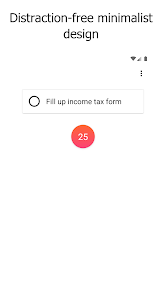
Distraction-free Minimalist Design
WeFocus comes with distraction-free minimalist design. It has 2 items on screen.
• A text field to write down what do you want to do, so that you only do one thing at a time.
• A button to get start.
Hand Picked Sound to Immerse In
When pomodoro timer is running, you may choose a background sound. With the right background sound, you will immerse in your focused task, and ignore any surrounding distraction. WeFocus comes with various sound choices.
• Clock tick
• Rain
• Beach
• Bird
• Cafe
• Silent
Carefully Chosen Vibrant Colors for Work
WeFocus comes with a set of carefully chosen vibrant colors. During work, vibrant color will make you stay sharp, awake and focused.
Carefully Chosen Calm Pastel Colors for Rest
WeFocus comes with a set of carefully chosen calm pastel colors. During rest, calm pastel color will make you feel peaceful and calm.
Free Trial
7 days free trial is provided for every premium feature.
Ad-free
To avoid any distraction, WeFocus is an ad-free app.
Pomodoro technique
There are six steps in the original technique:
1. Decide on the task to be done.
2. Set the pomodoro timer (traditionally to 25 minutes).
3. Work on the task.
4. End work when the timer rings and put a checkmark on a piece of paper.[6]
5. If you have fewer than four checkmarks, take a short break (3–5 minutes) and then return to step 2; otherwise continue to step 6.
6. After four pomodoros, take a longer break (15–30 minutes), reset your checkmark count to zero, then go to step 1.
WeFocus: Focus, Pomodoro Timer 使用排名
使用率排名基于 Similarweb 的算法,该算法会计算 28 天内的当前安装量和活跃用户数。
所有品类在
美国--
生产力在
美国--




 WeFocus: Focus, Pomodoro Timer VS.
 四月 17, 2026