

2月27日的Gira HomeServer/FacilityServer应用程序分析

Gira HomeServer/FacilityServer
- Gira Giersiepen GmbH & Co. KG
- Google Play 商店
- 免费
- 生活方式
Gira HomeServer/FacilityServer
A simple and elegant way of operating complex building technology while away or from any room at home: with the Gira HomeServer app, you have everything under control – with an Android device, via GSM, UMTS or WLAN, from outside or inside the building. The app acts as a client, communicating with the Gira HomeServer or FacilityServer: the Gira Interface displays all functions clearly and concisely and allows quick access to the building. The display is either horizontal or vertical and can be modified by simply rotating the device. Various profiles allow controlling different buildings such as a personal residence or company as well as various views of one building. In this way, different functions can be controlled from outside the building than from inside. Different views can also be created for users.
The most important features:
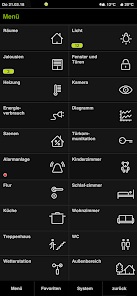
Main menu
The main menu displays all building functions. Date, time, current temperature and active functions can be viewed via the status bar. The jump back to the main menu is via the lower navigation bar.
Room list
All rooms of a property are assigned by floor. The overview of all applications installed in a room can be opened by touch.
Room functions
The functions within a room and their status are recognizable at a glance and can be operated with a touch. For more complex functions such as the heating control system, a pop-up menu is opened. If the device is rotated by 90°, the horizontal format opens a further view of the time clock functions.
Time clock
A function can be adapted to personal requirements via a range of filter functions; random values are also possible in this way.
Diagrams
Diagrams enable the clear display of detected and evaluated consumption data by year, month, week, day or hour. If the unit is turned by 90°, the last active diagram appears in the horizontal format. Temperature differences, for example, can be visualised via multi-touch.
Messages
Alarm and fault messages, measured values and states of the various components integrated in the system are clearly displayed.
Weather data
The data from the weather station installed on the building such as wind speed, precipitation and temperatures are available at a glance.
Energy generation and fill levels
The energy generation of a photovoltaic system can be viewed just as easily as the fill level of a cistern for rain water.
Camera
Cameras on the grounds can be called up with one operational step.
"Design 0" must also be activated in the QuadClient.
A list of specialists for intelligent building technology is available at www.gira.com/en/bezugsquellen
Gira HomeServer/FacilityServer 使用排名
使用率排名基于 Similarweb 的算法,该算法会计算 28 天内的当前安装量和活跃用户数。
所有品类在
美国--
生活方式在
美国--


 Gira HomeServer/FacilityServer VS.
 二月 27, 2026