

4月15日的Grid Drawing应用程序分析

Grid Drawing
- The AppGuru
- Google Play 商店
- 免费
- 艺术与设计
Grid Drawing is an art and illustration technique that involves Drawing a Grid over your Reference Photo and then creating a Grid of the same ratio on your work surface like wood, paper or canvas. The artist then draws the image on the work surface, focusing on one square at a time, until the entire image has been transferred or reproduced.
Grid Drawing technique provides a practical and efficient approach to improving the drawing skills and artistic abilities of an Artist, by making certain that the recreated image is accurate and proportional. This method of Drawing serves as an indispensable learning tool in the life of an artist.
The benefits of using the Grid Drawing technique include proportional accuracy, scale and size modification, breaking down complexity, enhanced observational skills, improved hand-eye coordination and confidence Building.
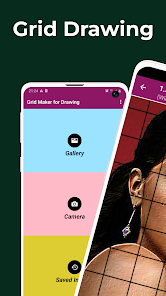
Grid Maker For Drawing android app breaks down the Reference Photo into smaller squares (rows and columns), and each square contains a part of the overall picture. The artist then recreates those squares on a larger scale, one square at a time with tremendous accuracy.
Grid Maker android app also improves your Drawing skills by maintaining proportions and image details.
Grid Drawing app also comes with a lot of tools/customizations that aid the accurate and timely transfer of your reference photo to your work surface with great accuracy and precision.
Drawing Grid For The Artist is designed for both beginners and advanced artists to improve their observational and drawing skills.
Key features of Grid Maker For Drawing With Measurements -
1. Take a new picture with your Camera. JPEG, PNG and WEBP formats supported.
2. Select an existing image from your Gallery. JPEG, PNG and WEBP formats supported.
3. Select or share an existing image from your favorite file manager and apps. JPEG, PNG and WEBP formats supported.
4. Square grids
5. Rectangular grids
6. Enable / Disable Grid drawing over picture.
7. Draw diagonal grids
8. Enter number of rows and Y-axis offset.
9. Enter number of columns and X-axis offset.
10. Choose the grid color.
11. Enable / Disable grid Labelling.
12. Label Size and Label alignment (Top, bottom, left and right).
13. Increase or decrease the thickness of grid lines.
14. Image Measurements - get the exact image size (Pixels (px), Inches (in), Millimeters (mm), Points (pt), Picas (pc), Centimeters (cm), Meters (m), Feet (ft), Yards (yd))
15. Cell Measurements - get the exact cell size (Pixels (px), Inches (in), Millimeters (mm), Points (pt), Picas (pc), Centimeters (cm), Meters (m), Feet (ft), Yards (yd))
16. Full screen mode
17. Compare Drawing - compare your drawing in real-time with the reference picture.
18. Lock Screen.
19. Pixel - Get the HEXCODE, RGB & CMYK value of a selected pixel on the reference photo.
20. Zoom in / zoom out of image (50x)
21. Enable / Disable Zooming
22. Effects - Black and white, Bloom, Cartoon, Crystal, Emboss, Glow, Gray Scale, HDR, invert, Lomo, Neon, Old school, Pixel, Polaroid, Sharpen and Sketch.
23. Crop image (Fit image, Square, 3:4, 4:3, 9:16, 16:9, 7:5, custom)
24. Rotate Image (360 degrees)
25. Flip Image vertically and horizontally
26. Adjust brightness, contrast, saturation and hue of image.
27. Save, share and print gridded images. .
28. Saved Images - Access all your saved grids at your convenience.
Grid Drawing is the ultimate app for beginners and advanced artists who seek improvement, precision and accuracy in their artwork.
Feel free to contact us, if you have any questions or suggestions. Thank you.
Grid Drawing 使用排名
使用率排名基于 Similarweb 的算法,该算法会计算 28 天内的当前安装量和活跃用户数。
所有品类在
美国--
艺术与设计在
美国#202
用户兴趣点和热门类别
Grid Drawing 用户使用的热门类别和应用程序









 Grid Drawing VS.
 四月 15, 2026