

4月17日的Smart Printer: Print & Scan应用程序分析

Smart Printer: Print & Scan
- VAT LLC
- Google Play 商店
- 免费
- 生产力
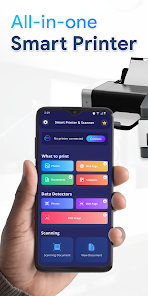
Print photos, documents, PDFs, boarding passes, and more — anytime, anywhere with Smart Printer. This app makes it easy to print and scan directly from your Android device to most WiFi, Bluetooth, or USB-connected printers.
Smart Printer is a convenient solution that allows you to scan and print files directly from your printer. With this app, you can print images, photos, web pages, PDFs, and Microsoft Office documents without the need for any additional apps or printing tools. Enjoy the flexibility of printing anytime, anywhere, on almost any WiFi, Bluetooth, or USB printer.
Smart Printer - Print Scanner makes printing a breeze, whether your printer is right next to you or located across the world!
🖨️ Key Features
✅ Print from Android
Print photos, documents, web pages, and emails
Edit and print multiple photos per sheet
Print posters, cards, calendars, labels, and quizzes
Supports printing PDFs, Microsoft Office files, and HTML content
📄 Scan & Share
Scan documents using your device camera
Edit scanned files before printing
Share via email, cloud storage, or messaging apps
📡 Printer Compatibility
Smart Printer supports a wide range of popular printer brands that accept wireless or local printing:
Printers from HP, Canon, Epson, Brother, Samsung, Xerox, Dell, Lexmark, and others
• HP Officejet, HP LaserJet, HP Photosmart, HP Deskjet, HP Envy, HP Ink Tank, and other HP models
• Canon PIXMA, Canon LBP, Canon MF, Canon MP, Canon MX, Canon MG, Canon SELPHY, and other Canon models
• Epson Artisan, Epson WorkForce, Epson Stylus, and other Epson models
• Brother MFC, Brother DCP, Brother HL, Brother MW, Brother PJ, and other Brother models
• Samsung ML, Samsung SCX, Samsung CLP, and other Samsung models
• Xerox Phaser, Xerox WorkCentre, Xerox DocuPrint, and other Xerox Models
• Dell, Konica Minolta, Kyocera, Lexmark, Ricoh, Sharp, Toshiba, OKI, and other printers
(Note: This app is not affiliated with or endorsed by any brand mentioned above.)
📌 Disclaimer
This app does not install or control any printer hardware.
Brand names used are for compatibility reference only.
Ensure your printer supports wireless printing for best results.
📃 Privacy Policy: https://vananhtien.com/about/privacy/
📄 Terms of Use: https://vananhtien.com/about/terms/
Smart Printer: Print & Scan 使用排名
使用率排名基于 Similarweb 的算法,该算法会计算 28 天内的当前安装量和活跃用户数。
所有品类在
美国--
生产力在
美国--



 Smart Printer: Print & Scan VS.
 四月 17, 2026