

4月27日的MLUSB Mounter - File Manager应用程序分析

MLUSB Mounter - File Manager
- メディアロジック (Media Logic, corp.)
- Google Play 商店
- 免费
- 生产力
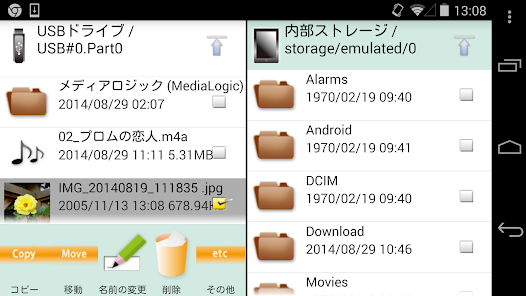
MLUSB Mounter is a file management app of Android terminal(hereinafter terminal).
Overview
You can access files in the terminal and files in USB devices(memory,harddisk,card reader etc).
Also, you can backup the files in the terminal to the USB device or copy the files inside the USB device into the terminal.
(Connect USB device to terminal with USB OTG cable.)
Features
MLFS installed
- Possible to access the USB device of the file system that the OS of the terminal does not support
- NTFS write support! BD/DVD media accessible!
[Supported file system]
NTFS(*1),exFAT(*2),FAT32,FAT16,UDF(*3),ISO9660(*3)
*1: Read-only.
Becomes possible to write by purchasing the extensions "MLUSB NTFS Write".
*2: Becomes possible to mount by purchasing the extensions "MLUSB exFAT File System Support".
*3: Becomes possible to mount read-only by purchasing the extensions "MLUSB UDF/ISO Mount".
"MLFS": Original technology to directly control USB devices and mount various file systems.
Other features
- Various file operations such as [Copy/Move/Delete/Rename] can be done.
- Independent filelist of 2 screens can be displayed.
- Supports WebDAV client function. Access to WebDAV device and WebDAV server is possible.
Extensions(Free)
ML MediaPlayer
- Movie playback app dedicated to MLUSB mounter.
- See below for details.
https://play.google.com/store/apps/details?id=jp.co.medialogic.mediaplayer
Extensions(Pay)
Purchase is required when using the following functions.
MLUSB Google Cast
- Can cast the contents of the terminal to Chromecast etc. and watch it on TV.
MLUSB UDF/ISO Mount
- Can connect USB BD/DVD drive and access BD/DVD media(UDF/ISO9660).
- Can refer to BD/DVD media as ISO image file.
Can play DVD-Video by using the DVD menu by opening ISO file with Kodi etc media player app.
Can import ISO files into the terminal.
- ISO file can be mounted as BD/DVD media.
- Video CDs can also be played.
Notes:
- Not support copyright protected media.
MLUSB Disk Utility
Disk management of USB devices is possible without PC.
Disk Formatter
- Can be formatted with FAT32,FAT16,exFAT.
Disk Eraser
- Can overwrite the data and erase it completely.
Disk Checker
- Can inspect the disk.
MLUSB Auto Backup
- Autobackup Movie/Photo/Music files to USB device.
MLUSB WebDAV Server
- Can share the folder of the volume inside the terminal/USB device as a WebDAV server.
- The WebDAV shared folder can be accessed from Android's WebDAV compatible app, PC Web browser, etc.
MLUSB exFAT File System Support
- Add exFAT mount function to MLFS.
MLUSB NTFS Write
- Add NTFS write function to MLFS.
MLUSB ISO9660 Write
- Can write files and folders to DVD-R and DVD-RW media in an ODD drive connected to USB.
MLUSB Blu-ray Authoring
- Can author MP4 video files into Blu-ray BDMV format and write them to BD-R, BD-RE media in a Blu-ray drive connected via USB.
System Requirements
OS etc.
Android 5.0 or later
Android TV
Devices
Built-in storage, SD card, USB mass storage.
Details, visit the website.
http://www.medialogic.co.jp/
* DISCLAIMER
"Media Logic, corp." IS NOT RESPONSIBLE FOR ANY DAMAGE OR LOSS OF ANY PROGRAMS, DATA OR INFORMATION ON THE PRODUCT BEING SERVICED.
MLUSB Mounter - File Manager 使用排名
使用率排名基于 Similarweb 的算法,该算法会计算 28 天内的当前安装量和活跃用户数。
所有品类在
美国--
生产力在
美国--
用户兴趣点和热门类别
MLUSB Mounter - File Manager 用户使用的热门类别和应用程序














 MLUSB Mounter - File Manager VS.
 四月 27, 2026