


4月29日的Smart Alarm (Alarm Clock)应用程序分析

Smart Alarm (Alarm Clock)
- TanyuSoft
- Google Play 商店
- 免费
- 生活方式
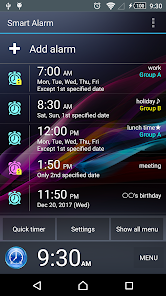
This is a simple and highly functional alarm clock "Smart Alarm" Free version.
It is also very easy to use!
You can get the alarm again at the specified time by snooze function even if the alarm is stopped.
The alarm can be set to repeat every week on specified days of the week.
The wallpaper which is used in the device can be showed as the background for this app by using the transparency setting.
【Other functions】
■ Corresponds to the holiday in the United States. You can exclude the public holiday from repeated alarm settings
■ You can set the music that is on SD card as the alarm sound.
■ This alarm clock has the mode to increase gradually with an alarm sound and it has vibration that can be set by the strength of the two-stage. They will prevent be surprised to sudden loud alarm sound.
■ It is possible to change the size of the alarm stop button and snooze button. It will prevent the mistake to stop the alarm by mistake.
■ It is possible to set the alarm to stop by solving a math problem or enter the number. You can prevent overslept by an intricate alarm stop operation
■ You can customize Side key, Back key and Menu key as to stop alarm or snooze or adjust the alarm volume.
■ You can switch to enable / disable the alarm sound and vibration in silent mode.
■ You can set whether output the alarm sound from the speaker of the device when the headphones are plugged in.
【Restriction of the free version】
○ The ad will be displayed.
○ The alarms that can be registered are 10 or less.
【Note】
● If the power of the device is not turned on at the time that alarm is set, the alarm will not work.
●Please register on the exclusion list if you are using any task killer apps or power-saving apps. And do not force stop app on task manager. It may cause the alarm does not work.
● When you set any music on SD card as the alarm sound, it will sound the alarm in the default ringtone if SD card mounts are off at alarm time.
※ We recommend that you set the alarm after confirming the operation of the preview feature when you set the alarm.
【About permissions】
"FULL INTERNET ACCESS"
"VIEW NETWORK STATE"
→ are used for advertising display function.
"PREVENT DEVICE FROM SLEEPING"
→ are used for prevent device from sleeping when alerting.
"CONTROL VIBRATOR"
→ is used for the vibration function.
"AUTOMATICALLY START AT BOOT"
→ is used in order to configure the alarm timer when you boot the device.
"MODIFY/DELETE USB STORAGE CONTENTS MODIFY/DELETE SD CARD CONTENTS"
→ is used for backup and restore the alarm settings.
"MODIFY GLOBAL SYSTEM SETTINGS"
→ is used to show next alarm time on lock screen.
Smart Alarm (Alarm Clock) 使用排名
使用率排名基于 Similarweb 的算法,该算法会计算 28 天内的当前安装量和活跃用户数。
所有品类在
美国#6,329
生活方式在
美国#448
用户兴趣点和热门类别
Smart Alarm (Alarm Clock) 用户使用的热门类别和应用程序






















 Smart Alarm (Alarm Clock) VS.
 四月 29, 2026