

3月28日的SSH/SFTP Server - Terminal应用程序分析

SSH/SFTP Server - Terminal
- Banana Studio
- Google Play 商店
- 免费
- 工具
A powerful application allows you to run SSH/SFTP Server on your phone with full functional terminal.
APPLICATION FEATURES
√ Use any network interfaces in your device including: Wi-Fi, Ethernet, Tethering...
√ Multiple users (anonymous user included: username=ssh without password)
• [SFTP feature] Allow each user to show hidden files or not
√ [SFTP feature] Multiple access paths for each user: Any folders in your internal storage or external sdcard
• [SFTP feature] Can set read-only or full write access on each path
√ Automatically start SSH/SFTP Server when certain WiFi is connected
√ Automatically start SSH/SFTP Server on boot
√ Has public intents to support scripting
For Tasker integration:
Add new Task Action (choose System -> Send Intent) with the following information:
• Package: net.xnano.android.sshserver
• Class: net.xnano.android.sshserver.receivers.CustomBroadcastReceiver
• Actions: either one of following actions:
- net.xnano.android.sshserver.START_SERVER
- net.xnano.android.sshserver.STOP_SERVER
APPLICATION SCREENS
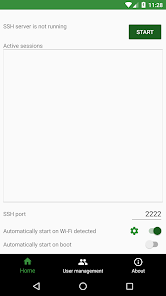
√ Home: Control the server configurations such as
• Start/stop server
• Monitor the connected clients
• Change port
• Enable automatically start on boot
• ...
√ User management
• Manage users and access paths for each user
• Enable or disable user
√ About
• Information about SSH/SFTP Server
NOTICES
- Doze mode: Application may not work as expected if doze mode is activated. Please go to Settings -> Search for Doze mode and add this application to the white list.
PERMISSIONS NEEDED
√ WRITE_EXTERNAL_STORAGE: Mandatory permission for SSH/SFTP Server to access files in your device.
√ INTERNET, ACCESS_NETWORK_STATE, ACCESS_WIFI_STATE: Mandatory permissions to allow user to connect to SSH/SFTP Server.
√ Location (Coarse location): Only required for user who wants to automatically start server on Wi-Fi detect on Android P and above.
Please read Android P restriction about getting Wifi's connection info here: https://developer.android.com/about/versions/pie/android-9.0-changes-all#restricted_access_to_wi-fi_location_and_connection_information
Which SSH/SFTP clients are supported?
√ You can use any SSH/SFTP clients on Windows, Mac OS, Linux or even browser to access this SSH/SFTP Server.
Tested clients:
• FileZilla
• WinSCP
• Bitvise SSH client
• Finder (MAC OS)
• Any terminal/File manager on Linux
• Total Commander (Android)
• ES File Explorer (Android)
SUPPORT
If you're facing any problems, want new features or have feedback to improve this application, don't hesitate to send it to us via the support email: support@xnano.net.
NEGATIVE COMMENTS can't help the developer solve the problems!
Privacy Policy
https://xnano.net/privacy/sshserver_privacy_policy.html
SSH/SFTP Server - Terminal 使用排名
使用率排名基于 Similarweb 的算法,该算法会计算 28 天内的当前安装量和活跃用户数。
所有品类在
美国--
工具在
美国--





 SSH/SFTP Server - Terminal VS.
 三月 28, 2026