


4月30日的Screenshot Assistant应用程序分析

Screenshot Assistant
- Waskysoft
- Google Play 商店
- 免费
- 工具
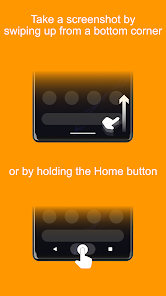
Take a screenshot by swiping up from a bottom corner or by holding the Home button.
Features:
• Crop screenshot to the desired size
• Draw on screenshot
• Save screenshot to the device
• Share screenshot with your friends
How to configure the app:
• From the Home screen navigate to Settings
• Select Apps
• Press Settings icon in the upper right corner
• Select Assist & voice input
• Press Assist app and select Screenshot Assistant
Screenshot Assistant 使用排名
使用率排名基于 Similarweb 的算法,该算法会计算 28 天内的当前安装量和活跃用户数。
所有品类在
德国#2,991
工具在
德国#387
用户兴趣点和热门类别
Screenshot Assistant 用户使用的热门类别和应用程序



















 Screenshot Assistant VS.
 四月 30, 2026