

4月23日的Office NX: PlanMaker应用程序分析

Office NX: PlanMaker
- SoftMaker Software GmbH
- Google Play 商店
- 免费
- 生产力
■ PlanMaker
► The only complete Office spreadsheet program for your Excel files
► Work on your Excel spreadsheets wherever and whenever you want.
► When working on the go, take advantage of a feature set that you would otherwise only know from your PC or Mac.
► Almost all features can be used permanently free of charge.
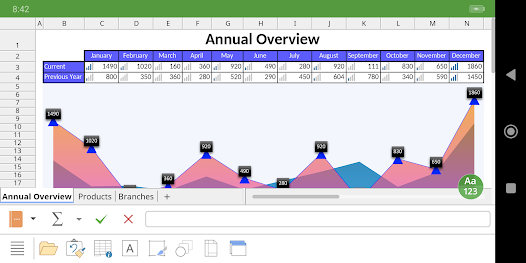
The complete set of features that you know from Microsoft Excel or PlanMaker on your PC is now offered by PlanMaker on your smartphone and tablet.
Compatibility without compromise: PlanMaker uses the Microsoft Office XLSX format as its native format. This guarantees seamless data exchange. You can open your spreadsheets directly in Microsoft Excel without having to convert them.
Intuitive operation on smartphones and tablets: PlanMaker always provides an ideal user experience, regardless of whether you're using it on your smartphone or a tablet. On a phone, you can use the practical toolbars with just one finger. On your tablet, you work with ribbons similar to those on your PC.
Save locally or in the cloud: PlanMaker not only enables you to open and save documents stored on your device, but it also allows you to access your files in Google Drive, Dropbox, Nextcloud and most other cloud services.
The PlanMaker user interface is available in English, German, French, Spanish, Italian and more than 20 other languages.
PlanMaker brings the features of a desktop spreadsheet program to your Android device. You shouldn't settle for less.
■ Working with files
► Worksheets can be losslessly exchanged with PlanMaker for Windows, Mac and Linux.
► Open and save XLSX and XLS files with full fidelity from Microsoft Excel 5.0 to 2021 and Excel 365, also with password protection
► Import and export assistant for text and CSV files
■ Extensive calculation capabilities
► 430 calculation functions, 1 million rows, 16384 columns
► Complex numbers and array functions
► AutoSum, AutoProduct, AutoFill, etc.
► External references
■ Editing and formatting
► Conditional formatting
► Format painter, borders, shading, fill patterns
► Cell styles
► Forms with input fields, dropdown lists, etc.
► Syntax highlighting
► Input validation (data validation)
► Password protection for sheets, workbooks and documents
■ Analyzing data
► AutoFilter
► Tables – specified areas of the worksheet that can be quickly formatted, modified and analyzed
► Pivot tables
► Scenarios
► Data grouping (outliner)
► Transpose
► Goal seeker
► Detective ("formula auditing") for troubleshooting
■ Comprehensive graphics functions
► Draw and design directly in the worksheet
► Excel-compatible AutoShapes
► Insert images
► Crop pictures, change brightness and contrast
► TextArt feature for font effects
■ Presenting and visualizing data
► More than 80 types of 2D and 3D charts
► Impressive effects: soft shadows, rounded edges, etc.
■ Other features
Almost all features of PlanMaker for Android can be used free of charge. The following additional features are available to you via an inexpensive subscription:
► Printing
► Export to PDF and PDF/A
► Sharing documents directly from PlanMaker
► Free customer support
A single subscription unlocks these features simultaneously in PlanMaker, TextMaker and Presentations for Android.
Office NX: PlanMaker 使用排名
使用率排名基于 Similarweb 的算法,该算法会计算 28 天内的当前安装量和活跃用户数。
所有品类在
德国#3,822
生产力在
德国#398
用户兴趣点和热门类别
Office NX: PlanMaker 用户使用的热门类别和应用程序













 Office NX: PlanMaker VS.
 四月 23, 2026