


4月30日的Remote for Fire TV & FireStick应用程序分析

Remote for Fire TV & FireStick
- BoostVision
- Google Play 商店
- 免费
- 娱乐
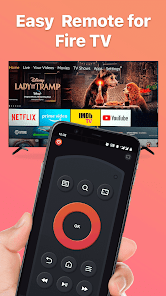
Remote for Fire TV & FireStick is designed specifically to control Fire TV using your Android mobile device. Supports Fire TV Box, Fire TV Stick, Fire TV Cube, and Fire TV.
Just connect an Android mobile device and Fire TV or Fire Stick to the same Wi-Fi network and you will be able to control it using a mobile device after enabling ADB on Fire TV.
Features:
- Fully functional remote control TV as a real Fire TV Remote
- Keyboard feature to simplify text input and search on TV
- Quick access to your favorite channels and apps
- Mirror phone screen to Fire TV in low latency
- Cast local photos and videos from phone to Fire TV
- Power ON/OFF Fire TV with just a tap
- Turn UP/Down volume with ease
- Enable Fire device auto-connect control button
NOTES: please download our companion mirroring receiver app, Screen Mirroring for Fire TV, on your TV device for smooth screen mirroring/cast.
How to connect to Fire TV or Fire Stick:
1. You must enable ADB debugging on your Fire device before connecting.
2. Your Fire TV must be connected to your home's wifi network.
3. Your Android phone's WiFi must be turned on and connected to the same network as the Fire TV.
4. Tap to connect device. The app will automatically search for Fire devices in your home.
How to screen mirror/cast to Fire TV:
1. Launch this remote app and connect it to Fire TV under the same network.
2. Click "Mirror" to enter the mirroring interface and choose to download our receiver app, Screen Mirroring Receiver for Fire TV, on the TV device per the prompt message.
3. After the receiver app is successfully downloaded on Fire TV, restart mirroring or choose to cast on the phone.
4. Enjoy smooth screen mirroring/casting now!
Troubleshoot:
• This app can only connect if you are on the same WiFi network as your TV device.
• For cases of not being able to connect to Fire TV, reinstalling this app and rebooting the TV can fix most of the bugs.
NOTE: BoostVision is not an affiliated entity of Amazon.com Inc. and this application is not an official product of Amazon.com Inc. or its affiliates.
Terms of Use: https://www.boostvision.tv/terms-of-use
Privacy Policy: https://www.boostvision.tv/privacy-policy
Visit Our Page: https://www.boostvision.tv/app/fire-tv-remote
Remote for Fire TV & FireStick 使用排名
使用率排名基于 Similarweb 的算法,该算法会计算 28 天内的当前安装量和活跃用户数。
所有品类在
巴西#5,589
娱乐在
巴西#382
用户兴趣点和热门类别
Remote for Fire TV & FireStick 用户使用的热门类别和应用程序














 Remote for Fire TV & FireStick VS.
 四月 30, 2026