







by Darrell Mordecai4 Min.
Oct 21, 2026

Your AI tool is only as good as the data it can reach.
Ask it about a competitor’s traffic trend, a prospect’s tech stack, or which keywords are winning in your category. It’ll give you an answer. What it won’t give you is a fresh one. Your AI is effectively operating in the dark, forced to rely on “best-guess” projections or outdated benchmarks that no longer reflect market reality.
An MCP is the bridge that changes that, connecting your AI assistant to live data sources so it stops guessing and starts pulling real answers.
MCP, short for Model Context Protocol, is an open standard that lets AI assistants connect directly to live data sources in real time. Instead of your AI working only from its training data, it can reach out to external tools, databases, and platforms mid-conversation and pull back current, accurate information.
Introduced by Anthropic, MCP in AI has since been adopted by OpenAI, Google DeepMind, Microsoft, and most major AI platforms. It’s quickly becoming the default way AI systems connect to the outside world.
To make that connection work, every MCP setup relies on an MCP server: a program that sits on the data source side and exposes specific capabilities, data, or actions that an AI assistant can call on during a conversation.
For example, a CRM server gives it access to customer records. A web analytics server gives it access to traffic data. Similarweb’s MCP server gives access to 77 data endpoints covering website traffic, keyword performance, audience demographics, technographics, app intelligence, and more.
Every MCP connection works through the same three-part architecture:
When you ask a question that needs live data, the host recognizes what’s needed, the client calls the right server, the server fetches the data, and the answer comes back in seconds. From your side, you just asked a question and got a real answer.
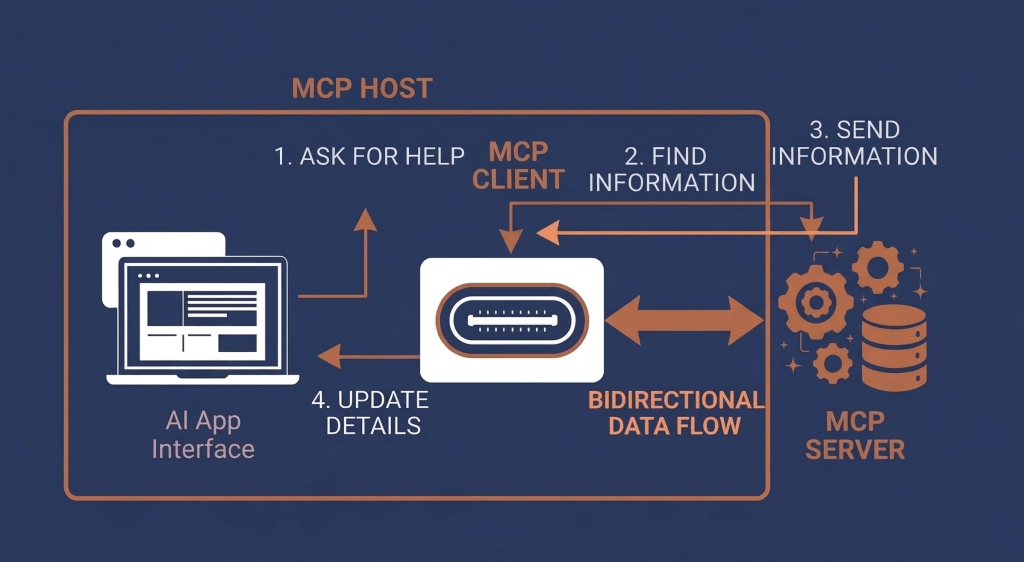
For a digital analyst, that means competitive research without a spreadsheet in sight. For a sales rep, prospect intelligence without leaving the AI workflow. For a marketer, keyword gaps and traffic trends on demand, not after a 20-minute export process.
Here’s what MCP in AI looks like across a realistic B2B workflow:
This is the part worth pausing on.
The Similarweb MCP server isn’t built for one type of user or one type of question. It opens up 77 data endpoints across the full product suite:
Whatever question you’re trying to answer, there’s almost certainly a Similarweb data endpoint that gets you there.
You bring the use case. The data is already there.
This is where it gets interesting.
The teams already using Similarweb MCP aren’t just asking quick questions. They’re building things. Here’s what that looks like in practice.
Most competitive analysis breaks down at the assembly stage. The data exists, but pulling it from five different places, formatting it, and making it coherent takes longer than the actual thinking.
MCP removes that entirely. One prompt to your LLM returns traffic trends, channel mix, audience demographics, geographic breakdown, and tech stack across multiple competitors, all live, all in one place.
One prompt. Multiple competitors. Every metric that matters.
The real power isn’t in pulling one metric. It’s in combining them.
For example, ask your LLM: “For Zara, Asos and H&M, pull visit duration, pages per visit, and bounce rate for the last three months. Rank them by engagement quality and flag which brand has improved or declined the most.”
That’s traffic trend, competitor data and benchmark, cross-referenced in one query, returned as a strategic brief.

Beyond answering questions, teams are using MCP to build purpose-built AI skills.
An agency built a client-facing AI assistant that answers competitive questions using live Similarweb data, giving account teams a credible, data-backed answer in any meeting or pitch, without opening a single dashboard.
A sales team built a prospecting agent that pulls technographic and traffic data on a target list and returns a prioritised pipeline with talking points per account: what tech stack they run, whether traffic is growing, which channels they rely on.
This is where things get interesting for anyone doing outbound sales.
Similarweb technographics show you the tech stack running on any website: the ecommerce platform, the marketing tools, the CMS, the analytics setup. For a sales team, knowing that a prospect runs Shopify Plus and recently added a customer data platform tells you exactly where they are in their growth journey.
That’s not background research. That’s your opening line.
💡 Be specific in your prompts. Vague questions return vague answers. “Compare traffic for these three domains over the last three months, broken down by channel” beats “tell me about these sites” every time.
💡 Combine datasets in a single query. The real value of MCP isn’t one data point. It’s cross-referencing multiple signals in one go. Traffic plus demographics plus keyword data tells a story none of them tells alone.
💡 Watch your credit consumption. Complex queries that pull multiple metrics across multiple domains use more credits. Monitor usage in Similarweb’s Data Credits Management dashboard if you’re running high-volume workflows.
💡 Use the output as a starting point, not a final answer. MCP gives your AI access to real data, but interpretation still needs a human. Use it to surface signals, not to replace judgement.
💡 Start with one workflow, not ten. The teams getting the most value picked one repeatable research task, automated it with MCP, and expanded from there.
Similarweb has always had the data. What’s new is how easily you can get to it.
Our MCP removes the steps between your question and a real answer. Whether you’re building a custom AI agent, running quick competitor research, or answering a client question on the fly, the data is there when you need it.
120 new clients figured that out in the first two weeks alone.
Want to try it? Get started now!
How is MCP different from APIs?
APIs still require you to build and maintain individual integrations between tools. MCP standardizes that process, so AI tools can connect to multiple data sources through a single protocol, without custom development for each new connection.
Do you need coding skills to use an MCP server?
Not necessarily. Many AI tools (like Claude Desktop or Copilot Studio) allow you to connect MCP servers through simple configuration steps. You only need technical support if you’re building custom agents or workflows.
What types of data can MCP access in practice?
It depends on the server you connect to. MCP can expose anything from CRM records and web analytics to keyword data, technographics, and app performance, as long as the data source supports MCP.
Is MCP only useful for AI assistants, or can it power automation too?
It can do both. While MCP is commonly used in conversational AI, it can also power automated workflows (e.g., scheduled reports, alerts, or data pipelines) when combined with tools like n8n or custom agents.
How secure is connecting an MCP server to an AI tool?
MCP connections typically rely on API keys and controlled endpoints, meaning access is limited to predefined data and actions. As with any integration, security depends on how permissions and credentials are managed.
What should you look for in an MCP server provider?
Focus on data quality, coverage, and reliability. A good MCP server should offer structured, well-documented endpoints, frequent data updates, and enough depth to support real business use cases—not just basic queries.
Can MCP replace traditional BI tools and dashboards?
Not entirely. MCP can reduce the need to manually pull data and build reports, but dashboards are still useful for ongoing monitoring and standardized reporting. Many teams use both together.
How do teams typically get started with MCP?
Most start with one high-impact workflow, like prospect research or competitive analysis, connect a single MCP server, and expand from there once.

Content Marketing Manager
Hanna Mathé-Cohen, by day a Content Marketing Manager; at heart, a storyteller. With 3 years in B2B SaaS, she makes complex ideas simple, and even a little fun!

What Is Retail Intelligence? How It Works and Why It's Essential to Digital Commerce
Most Searched Things on Google in 2026
Harness the power of data with Similarweb’s APIs to drive smarter business decisions

