

You’ve hit your search limit
Start your free trial to keep exploring full traffic and performance insights.
Get StartedAnálisis de la app FSharing - Files, File Manager para 21 de febrero

FSharing - Files, File Manager
- Ngan Tran
- App Store de Apple
- Gratis
- Productividad
FSharing is a unique and exclusive file manager for iOS devices, It's the first app on the App Store to give you flexibilities to transfer files from iOS devices to PC, laptops and vice versa easily. It overcomes the complexities when you want to transfer files with iOS devices, It achieves this flexibility by employing the popular file transfer protocol SMB/CIFS that's is available in most popular operating systems. FSharing changes the way users normally use to transfer files with iOS devices, it removes USB cable completely, with this app installed on devices you don't need to use USB cable any more.
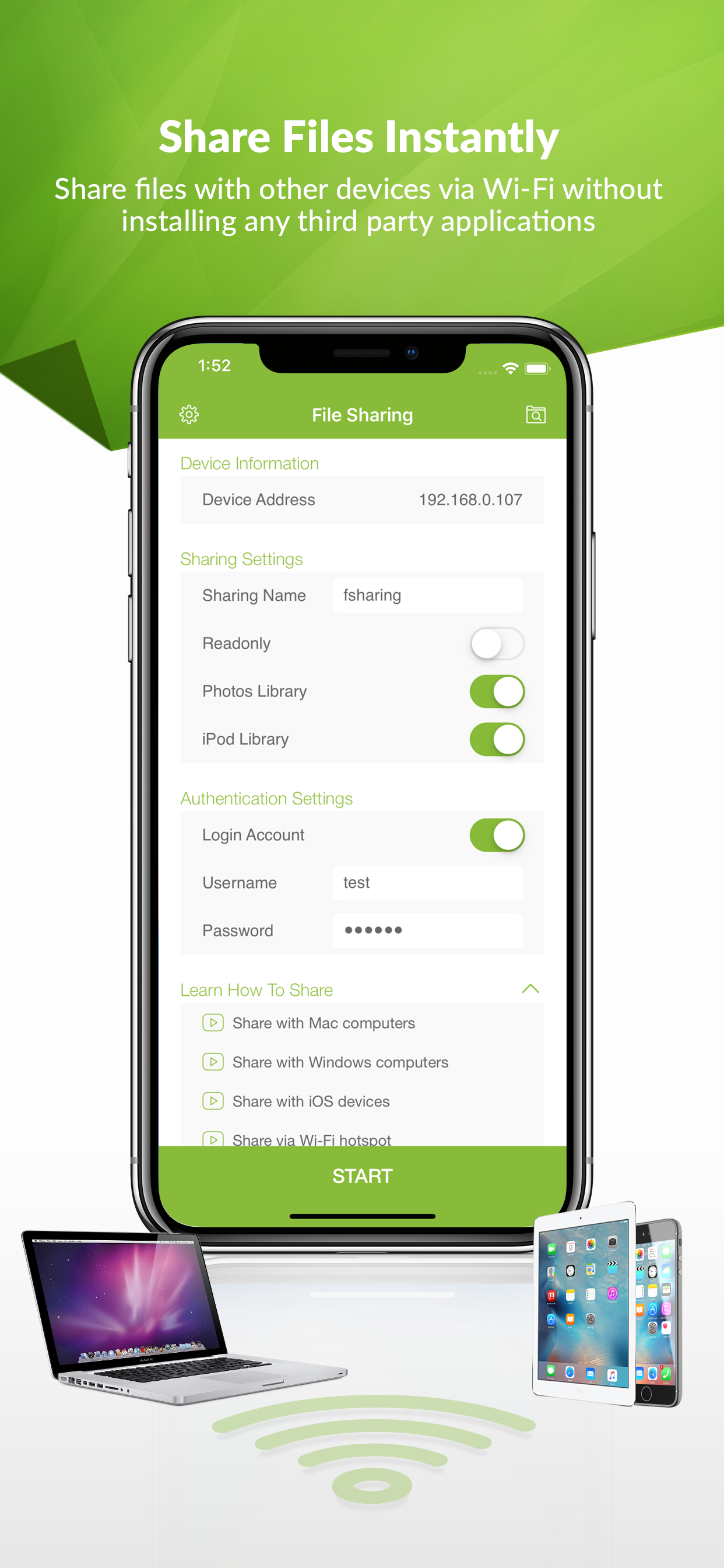
FSharing turns your iOS devices into a Wi-Fi shared drive, make it visible and accessible from your local network. Other devices can discover and access it, transfer files is extremely fast.
FSharing is a powerful file manager, a unified UI help you easily manage your files offline (on device) or online (cloud or remote drives), manage files in the same way when you access your local files, cloud drives (Dropbox, Google Drive, Microsoft OneDrive, Box) or remote drives (Windows SMB, FTP, SFTP, WebDAV).
FSharing has a powerful music player and video player, they can play any music or video formats and supports streaming on any cloud servers.
FSharing comes with add-ons, they provide more advanced functionalities. Each add-ons has a different role but they are deeply integrated with the app and they make FSharing more powerful.
Let’s explore FSharing main features.
FILE SHARING
• Share files instantly with other devices via Wi-Fi or in the same hotspot
• It doesn't require any third party apps installed on PC or laptops to transfer files
• Share Photo Library
• Share iPod Library
• Share with Readonly mode that don't allow users to change files in your device
• Share with Login Account that don't allow anonymous users to access your device
• Sharing works in background
• Automatically detect shared drives in local network
ACCESS CLOUD SERVICES AND REMOTE SERVERS
• Access popular remote servers FTP, SFTP, WebDAV and Windows SMB
• Access popular cloud services Dropbox, Google Drive, Microsoft OneDrive, Box
• Open files directly from cloud or remote servers without downloading them
• Copy or move files or folders between cloud or remote servers directly
• Show file thumbnails
• Search for files and folders
FILE MANAGER
• Copy/Move/Rename/Delete files
• Create ZIP files
• Create and organize folders
• Send emails with attachments
• Export files to other apps
• Copy or move files or folders to cloud services and remote servers (FTP, SFTP, WebDAV, Windows SMB)
• Unzip many formats ZIP, 7Z, A, CPIO, TAR, ISO, XAR, SHAR, USTAR, RAR, CAB, JAR, RPM, GZ, BZ2, Z, XZ
• Show file thumbnails
• Search for files and folders
• View in Grid or List modes
• Sorting and Filtering
MUSIC PLAYER
• Play around 60 audio formats AAC, AIFF, AIF, AIFC, AU, FLAC, M4A, MP2, MP3, OGA, OGG, OPUS, TTA, WAV, WMA, WV, CAF, ADX, AC3, AMR, MMF, etc.
• Play music in a playlist
• Play music directly on clouds or remote servers
• Play music in background
• Play with shuttle and no shuttle modes
VIDEO PLAYER
• Play around 65 video formats MKV, FLV, VOB, OGV, GIF, AVI, MTS, M2TS, MOV, WMV, ASF, MP4, MPG, MPEG, M2V, MXF, SWF, WEBM, 3GP, 3G2, TS, etc.
• Play streaming videos on cloud servers
• Play back and next videos
IMAGE VIEWER
• View around 70 image formats AAI, ART, AVS, BMP, CIN, CUR, DDS, DCX, DIB, DPX, FAX, FITS, FTS, G3, etc.
• View images directly on clouds or remote servers
DOCUMENT VIEWER
• View PDF files
• View Office documents
• View text files
• View other iOS compatible files
WEB BROWSER AND DOWNLOADER
• Surf web easily
• Download files on the Internet
• Save pages to PDF, WebArchive or HTML
• Bookmark favorites sites
• Download files in background
Clasificación de tiendas
El Store Rank se basa en múltiples parámetros establecidos por Google y Apple.
Todas las categorías en
Estados Unidos--
Productividad en
Estados Unidos--
Principales competidores & aplicaciones alternativas
Aplicaciones con una alta probabilidad de ser utilizadas por los mismos usuarios, desde la misma tienda.

FileBrowserGO: File Manager

My Space - File Manager

Phone Drive: File Storage

File Manager Explorer - eFiles
 FSharing - Files, File Manager VS.
 febrero 21, 2026