

You’ve hit your search limit
Start your free trial to keep exploring full traffic and performance insights.
Get StartedAnálisis de la app ClickMeeting Webinar App para 24 de febrero

ClickMeeting Webinar App
- ClickMeeting Sp. z o.o.
- Google Play Store
- Gratis
- Negocios
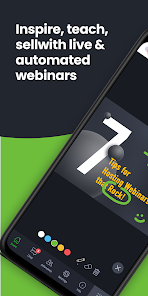
Being on the move doesn’t have to mean missing out a valuable webinar content and joining important online business meetings. With the ClickMeeting online event app, you can quickly attend or host:
• Online meetings;
• Virtual classrooms;
• Live, automated, or on-demand webinars.
With fresh, intuitive UX design and stunning audio-video quality, the ClickMeeting video conferencing app is a top choice for sharing knowledge and collaboration on the go.
From now on, the app can work in the background, so your event is not going to turn off if:
• You use other apps in the meantime, for instance, to send a message to a friend;
• You don’t take any actions on your screen for a longer time.
Attendees:
What can you expect from using the app?
• No screen-swiping to view a presentation, a presenter, and a chat. You can see it all on one screen.
• An incredibly easy way to join online events.
• The audio-video streaming quality will knock your socks off! :)
Organizers:
With the ClickMeeting app, you can:
• Broadcast paid webinars where attendees pay for joining your online expert events;
• Use a customized Call-To-Action button to redirect your events’ attendees to a landing page of your choice;
• Stream your events live on Facebook or YouTube;
• Interact with your audience in real-time through the Q&A mode;
• Make the most of your files stored in your cloud (Dropbox, OneDrive, Google Drive).
ClickMeeting – inspire, teach, sell, and collaborate
ClickMeeting is a browser-based web conferencing platform loved by thousands of business customers all over the globe. Flexibility and scalability make their webinar platform a top choice for solopreneurs, startups, small and medium companies, and large enterprises that discovered video conferencing as a perfect way to achieve their goals.
Who makes the most of ClickMeeting digital get-togethers?
• Marketers;
• Sales teams;
• Remote teams;
• Online teachers and trainers;
• C-level executives;
• Business and professional associations;
• HR specialists.
What types of online events can you host on the ClickMeeting web conferencing platform?
1. Live webinars. A classic and most popular version of webinars. You schedule your online event to happen at a specific time and, then, you meet your audience live. Live webinars are an ideal match for onboarding and training purposes as well as with sales events and product demos.
2. On-demand webinars. With this option, you pre-record your webinar to release it to your contacts, leads, or students so they can watch it anytime and anywhere they want. If your goal is generating leads and running online courses, on-demand webinars will be a way to go!
3. Automated webinars. Unlike on-demand events, you schedule automated webinars to take place on a specific day and hour. However, just like above, you need to have a recorded material first and then enrich them with tools like Call-To-Action, a video clip, or a survey.
4. Online meetings. Planned in advance or organized spontaneously. Online meetings are smaller web gatherings where up to 25 participants can see, hear, and talk to each other in one virtual conference room. It’s a way to go if you’re on the lookout for a real-time collaboration tool and organize virtual meetups with your team, customers, or business partners.
5. Huge virtual events. Powered up with webcasting technology, huge virtual events give you a chance to stream your content for up to 10k viewers!
Clasificación del uso de ClickMeeting Webinar App
El rango de uso se basa en el algoritmo de Similarweb que calcula las instalaciones actuales y los usuarios activos durante un periodo de 28 días.
Todas las categorías en
Estados Unidos--
Negocios en
Estados Unidos--
Intereses de los usuarios & Top categorias
Principales categorías y aplicaciones utilizadas por los usuarios de ClickMeeting Webinar App.
Categorías principales
Afinidad
Principales aplicaciones de la categoría
Más aplicaciones
24%






23%





18%




7%

Principales competidores & aplicaciones alternativas
Aplicaciones con una alta probabilidad de ser utilizadas por los mismos usuarios, desde la misma tienda.

GoTo

Marco Polo - Video Messenger

Jitsi Meet

RingCentral
ClickMeeting Webinar App VS. febrero 24, 2026