

Análisis de la app App Pad - Quick Launch para 15 de marzo

App Pad - Quick Launch
- kim.j.h
- Google Play Store
- Gratis
- Herramientas
App Pad is a tool that will make your life much easier. It gives you shortcuts to all your most frequently used apps, saving you time when looking for different windows or files on your device. It does all this through a simple panel similar to the notifications bar that you drop down to check your notifications.
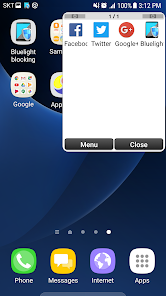
Thanks to App Pad, you can open all your favorite apps much faster than you normally would. The panel, consisting of 16 boxes where you can arrange your selected apps, is hidden so there's nothing to interfere with your browsing. To open the program, just drag your finger down from the top right corner of the screen to display the menu with all of the shortcuts you've created. You can add as many pages as you need.
You can set up the menu so that, along with the tools and games you use most, you'll find your most-used widgets for certain tasks. These shortcuts make life easier as you won't have to go searching for apps on your Android. In addition, the setup lets you choose where the panel opens from and what color you want it to be.
In short, App Pad is one of the best options you can find if you have so many apps that it's sometimes hard for you to find what you're looking for. In just a few clicks, you can open the widgets, tools, games, and shortcuts you use most frequently without adding anything extra to the screen. Speed and convenience, without any annoyances.
This is a useful App that can run frequently used Apps at anytime, anywhere.
You can run the Apps instantly without going to the home screen to look for Apps.
It helps run the Apps as quickly as possible in the environment where you can register, run, and manage them.
You can add as many pages as you want to manage and are free to add and delete them as well.
It is a convenient App that enables you to manage and run frequently used apps, widget, and shortcut more easily.
Once dragged on the pre-appointed button, the frequently used Apps show up on the registered page.
(During the first run, the initial button is located on the right upper corner. You can reset the location in Setting.)
Clasificación del uso de App Pad - Quick Launch
El rango de uso se basa en el algoritmo de Similarweb que calcula las instalaciones actuales y los usuarios activos durante un periodo de 28 días.
Todas las categorías en
Estados Unidos--
Herramientas en
Estados Unidos--
Principales competidores & aplicaciones alternativas
Aplicaciones con una alta probabilidad de ser utilizadas por los mismos usuarios, desde la misma tienda.

Beside - AI Phone Assistant
 App Pad - Quick Launch VS.
 marzo 15, 2026