

You’ve hit your search limit
Start your free trial to keep exploring full traffic and performance insights.
Get StartedAnálisis de la app Adobe Premiere Rush para 20 de abril

Adobe Premiere Rush
- Adobe
- Google Play Store
- Gratis
- Reproductores y editores de vídeo
Shoot, edit, and share online videos anywhere.
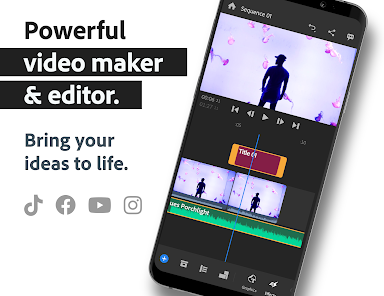
Feed your channels a steady stream of awesome with Adobe Premiere Rush, the all-in-one, cross-device video editor. Powerful tools let you quickly create videos that look and sound professional, just how you want. Share to your favorite social sites right from the app and work across devices. Use it for free as long as you want with unlimited exports — or upgrade to access all premium features and hundreds of soundtracks, sound effects, loops, animated titles, overlays, and graphics.
Add music and titles to videos and apply video effects to clips in your multitrack timeline with the video editor used by influencers, vloggers, and pros. Crop videos to customize and share to your favorite social sites, including YouTube, Facebook, Instagram and TikTok, right from the app.
PRO-QUALITY VIDEO
Built-in professional camera functionality lets you capture high-quality content right from the app and start video editing immediately.
EASY EDITING AND VIDEO EFFECTS
Arrange video, audio, graphics, and photos with drag and drop. Trim and crop videos, flip and mirror video clips, and add images, stickers and overlays to video clips. Adjust video speed with speed controls and enhance color with intuitive presets and customization tools.
Effortlessly create pan and zoom effects for images with one click. Make your videos pop by simply selecting the start and end points on your still images, and changing the scale and position as needed.
CUSTOMIZE ANIMATED TITLES
Access built-in animated graphics such as titles and overlays. Change the color, size, font, and more to make them yours.
GREAT SOUND
Add music to videos, including thousands of original, royalty-free soundtracks, sound effects, and loops.
MULTITRACK TIMELINE TO EDIT VIDEOS
Enjoy creative flexibility with multiple video tracks to achieve impressive effects like picture-in-picture and split-view.
MADE FOR SHARING
Crop videos for social. Easily resize videos from landscape to portrait to square for different channels. Share your videos with one click to TikTok, Instagram, Facebook , and YouTube. Portrait, 4:5, landscape, and square aspect ratios are supported. When the aspect ratio is changed, all media in a sequence is automatically resized — ideal for Instagram and YouTube.
PREMIUM USERS
Upgrade to Rush Premium to access all features and content, including:
ADVANCED AUDIO TOOLS
Advanced tools powered by Adobe Sensei AI for sound balancing and auto-ducking.
PREMIUM CONTENT LIBRARY
Unlock hundreds of premium titles, overlays, and animated graphics to elevate your videos.
ADDITIONAL PREMIUM FEATURES
Auto reframe automatically detects and keeps the most important part of your videos in the frame when switching to different aspect ratios – perfect for sharing to social media.
Advanced sharing automatically updates edits across all your mobile devices, and exporting in 4K is supported.
Questions?
• Learn & Support: https://helpx.adobe.com/support/rush.html
The Fine Print
Terms & Conditions:
Your use of this application is governed by the Adobe General Terms of Use http://www.adobe.com/go/terms_en and the Adobe Privacy Policy http://www.adobe.com/go/privacy_policy_en
Do Not Sell My Personal Information: www.adobe.com/go/ca-rights
Use of Adobe mobile apps and online services requires registration for a free Adobe ID as part of a free, basic level of Creative Cloud membership. Adobe online services require an internet connection, are not available in all countries or languages, and may be subject to change or discontinuation without notice.
Shoot and edit videos easier than ever with Premiere Rush, the all-in-one, cross-device video editor app. Add custom titles, apply video effects—such as color filters and speed—and quickly crop videos and resize them to share on your favorite social sites. Export in 4K video quality for pro results. Download Rush today, your new favorite video editing app.
Clasificación del uso de Adobe Premiere Rush
El rango de uso se basa en el algoritmo de Similarweb que calcula las instalaciones actuales y los usuarios activos durante un periodo de 28 días.
Todas las categorías en
Estados Unidos--
Reproductores y editores de vídeo en
Estados Unidos--
Intereses de los usuarios & Top categorias
Principales categorías y aplicaciones utilizadas por los usuarios de Adobe Premiere Rush.
Categorías principales
Afinidad
Principales aplicaciones de la categoría
Más aplicaciones
21%





11%



9%





7%




 Adobe Premiere Rush
abril 20, 2026