

You’ve hit your search limit
Start your free trial to keep exploring full traffic and performance insights.
Get StartedAnálisis de la app Edge Touch para 21 de febrero

Edge Touch
- Artvoke Creations
- Google Play Store
- Gratis
- Herramientas
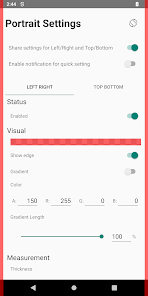
Block touches on top, bottom, left, right screen in portrait and/or landscape mode.
Buy me a coffee? https://play.google.com/store/apps/details?id=com.artvoke.edgetouch.donation
They are both the exact same app. Buy this app if you like the app and would love to buy me a coffee. If you do decide to buy me a coffee, please do keep just one of them installed on your device.
## Who is this app for? ##
- If you easily register accidental touches on edge/s when using a curve/bezeless phone
- If you easily register accidental touches on edge/s when holding phone with one/both hand
- If you need to block certain edge/s when playing games such as PUBG, Mobile Legend
- If you need to block certain edge/s for specific Application/s
- If you need to block certain edge/s everywhere except for specific Application/s
## The Noes (*Cause I'm relying on this app myself) ##
- No (internet, disk/storage access, dodgy etc) app permissions requested. See App permission section
- No Ads
- No tracking (That's why it's hard to track crashes)
- No in app purchase
- No battery drain
- No slowing down your phone
- No persisting notification to keep app running
- No pretty design and icon :(
## Features ##
## Features ##
- Highly customizable edge block. See Customization section
- Support top, bottom, left and right
- Support portrait and/or landscape
- Support adding shadows to edges by setting display edges with gradient color
- Support avoidance on (selected app, system ui, keyboard etc)
- Quick settings (notification tiles, persistent notification & bubbles)
- Auto starts on boot
- Lightweight and fast
## Customization ##
- Portrait and/or Landscape
- Enable/disable
- Show/hide
- ARGB color if shown
- Gradient
- Thickness
- Length
- Position on screen
- Disable when collide with selected app/s
- Enable only when collide with selected app/s
- Disable when collide with system ui (status, volume, nav bar)
- Auto resize when collide with keyboard
## Security note ##
- App does not request internet access. So not possible to receive any data in and/or transmit and data out
- App does not request disk/storage access. So not possible to write and store any data
## App permission ##
- [request delete packages] meant for prompting a dialog to request uninstalling edge touch app when user have both this and donation version installed. This app will not function properly if both of them are installed
- [run foreground service] meant for querying installed applications to allow user select which application/s (when runs in foreground) to enable/disable edge blocking
## Runtime permission ##
Accessibility Service:
Edge Touch blocking functionality depends on accessibility setting. The accessibility setting is used to render views on the screen edges to block unwanted touches. The setting is also used to read the current foreground application package name, system ui and keyboard. This is to allow Edge Touch to remove the rendered view when avoiding them is configured. Edge Touch does not control, read and modify any screen content. Edge Touch does not collect any personal and sensitive data.
These permissions are dangerous as they allow developers to read everything rendered on the screen. Fear not, as mentioned in Security note section, if the app do reads information rendered on the screen, it has no possible way to record and/or sending them out. Feel free to contact developer if you have any concern on this.
If you read this far, buy me a coffee? *TeeHee* https://play.google.com/store/apps/details?id=com.artvoke.edgetouch.donation
Clasificación del uso de Edge Touch
El rango de uso se basa en el algoritmo de Similarweb que calcula las instalaciones actuales y los usuarios activos durante un periodo de 28 días.
Todas las categorías en
Estados Unidos--
Herramientas en
Estados Unidos#6,762
Intereses de los usuarios & Top categorias
Principales categorías y aplicaciones utilizadas por los usuarios de Edge Touch.
Categorías principales
Afinidad
Principales aplicaciones de la categoría
Más aplicaciones
20%





12%

10%


9%



Principales competidores & aplicaciones alternativas
Aplicaciones con una alta probabilidad de ser utilizadas por los mismos usuarios, desde la misma tienda.

TimeMark Alarm: Time & Loc Cam
Typewise Offline Keyboard

Good Lock: Premium Lock Screen

TAP Kiln Control Mobile
Edge Touch VS. febrero 21, 2026