

You’ve hit your search limit
Start your free trial to keep exploring full traffic and performance insights.
Get StartedAnálisis de la app Brother iPrint&Scan para 24 de abril
Brother iPrint&Scan
- Brother Industries, Ltd.
- Google Play Store
- Gratis
- Herramientas
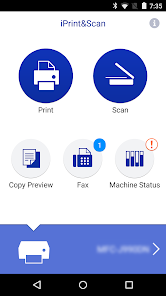
Brother iPrint&Scan is a free app that lets you print from and scan to your Android device. Use your local wireless network to connect your Android device to your Brother printer or all-in-one. Some new advanced functions have been added (edit, fax send, fax preview, copy preview, machine status). For a list of supported models, please visit your local Brother website.
[Key Features]
- Easy to use menu.
- Simple steps to print your favorite photos, web pages, and documents (PDF, Word, Excel®, PowerPoint®, Text).
- Print your documents and photos directly from the following cloud services: DropboxTM, OneDrive, Evernote®.
- Scan directly to your Android device.
- Save scanned images to your Android device or email them (PDF, JPEG).
- Automatically search for supported devices on a local wireless network.
- No computer and no driver required.
- The NFC function is supported, enabling you to print or scan by holding your mobile device over an NFC mark on your machine and tapping the screen.
*Memory card needed for printing and scanning.
*To use the NFC function, both your mobile device and your machine need to support NFC. There are some mobile devices with NFC that cannot work with this function. Please visit our support website (https://support.brother.com/) for a list of supported mobile devices.
"[Advanced Functions]
(Only available on new models.)"
- Edit previewed images using the editing tools (scale, straighten, crop) if necessary.
- Send a fax directly from your mobile device.(This app feature requires access to the contacts list on your mobile device.)
- View received faxes stored on your machine on your mobile device.
- The copy preview function enables you to preview an image and edit it if necessary before copying to avoid copy errors.
- View the machine’s status such as ink/toner volume and error messages on your mobile device.
*Compatible functions will depend on the selected device.
[Compatible Print Settings]
- Paper Size -
4" x 6" (10 x 15cm)
Photo L (3.5" x 5" / 9 x 13 cm)
Photo 2L (5" x 7" / 13 x 18 cm)
A4
Letter
Legal
A3
Ledger
- Media Type -
Glossy Paper
Plain Paper
- Copies -
Up to 100
[Compatible Scan Settings]
- Document Size -
A4
Letter
4" x 6" (10 x 15cm)
Photo L (3.5" x 5" / 9 x 13 cm)
Card (2.4" x 3.5" / 60 x 90 mm)
Legal
A3
Ledger
- Scan Type -
Color
Color (Fast)
Black & White
[Access Permission Information]
You must check and allow the essential access permissions below to use Brother iPrint&Scan service.
Essential Permission
• Contact information: access to your contact numbers is needed when you use functions like fax, but you can limit access to the specific contact necessary for the service.
Optional Permission
• Location information: It is requested only when you use device search features like Wi-Fi Direct, Bluetooth, or NFC.
Optional data is required to use the corresponding function, and even if permission is not granted, services other than the corresponding function can be used.
*Compatible settings will depend on the selected device and function.
*Evernote is a trademark of Evernote Corporation and used under a license.
*Microsoft, Excel, and PowerPoint are either registered trademarks or trademarks of Microsoft Corporation in the United States and/or other countries.
*To help us improve the application, send your feedback to Feedback-mobile-apps-ps@brother.com. Please note that we may not be able to respond to individual emails.
Clasificación del uso de Brother iPrint&Scan
El rango de uso se basa en el algoritmo de Similarweb que calcula las instalaciones actuales y los usuarios activos durante un periodo de 28 días.
Todas las categorías en
Estados Unidos#3,468
Herramientas en
Estados Unidos#426
Intereses de los usuarios & Top categorias
Principales categorías y aplicaciones utilizadas por los usuarios de Brother iPrint&Scan.
Categorías principales
Afinidad
Principales aplicaciones de la categoría
Más aplicaciones
18%





11%




8%





8%





Principales competidores & aplicaciones alternativas
Aplicaciones con una alta probabilidad de ser utilizadas por los mismos usuarios, desde la misma tienda.

Epson iPrint

Docusign - Upload & Sign Docs

Nelko

V380
Brother iPrint&Scan VS. abril 24, 2026