

You’ve hit your search limit
Start your free trial to keep exploring full traffic and performance insights.
Get StartedAnálisis de la app QR Code & Barcode Scanner para 17 de abril

QR Code & Barcode Scanner
- QR Easy
- Google Play Store
- Gratis
- Herramientas
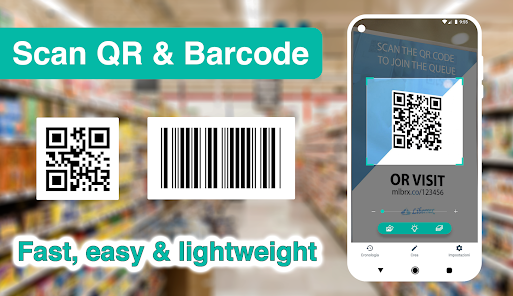
Developed by a professional engineering team, this is the most lightweight (but fast, efficient, and feature-rich) QR code scanner and barcode scanner app for Android you could ever find on Google Play Store 👍 💪
QR code reader, barcode scanner app focuses on the core functionality to scan and read the most common types of QR codes and barcodes with super fast speed and delightful user experience, designed for all Android devices.
QR code reader, barcode scanner app is extremely easy to use. It simply uses the Android phone's camera to scan and read QR code and barcode in a second then allows you to do appropriate actions effectively.
QR code scanner, barcode scanner android app helps you to scan and read all types of QR code and barcodes: Contact Info, Phone, Email, Website, Product, Text, SMS, Wifi, Map Location, Calendar Event and more…
QR code scanner, barcode scanner app can also read and help you to check the country origin and product information of a barcode to reduce the possibility of buying low quality or unknown origin products.
QR code scanner, barcode scanner app doesn’t require any special permission, it doesn’t collect any personal information or access to your device storage, contact list, or anything else. It’s simply a QR code reader app to help you scan QR codes and scan barcodes on the go, everywhere, using android phones.
QR code scanner, barcode reader app also has a QR generator feature allowing you to generate your own QR codes with different types easily.
Super-fast, super-lightweight, and easy to use
Appropriate actions on each QR code or Barcode: search on Google / Yahoo / Bing / Ecosia / DuckDuckGo, open a webpage, add a contact, send an email, call a phone number, connect to a wifi network, add an event to calendar...
History with search and filter
Advanced setting options to ensure the scanner is optimized for your own android's camera
Batch scan mode: Scan multiple QR codes and barcodes at once
Dark mode
QR code generator: generate QR code using your phone.
You can write notes on each scanned code.
HOW TO USE:
- To scan a QR code or barcode, simply open the QR scanner and barcode scanner app, point the camera in front of the QR code or barcode, and the app will automatically read the code and show you its content efficiently.
- To scan images from your device's gallery or even from content in any other apps, simply use the "Share" functionality in the Android menu: select the image in your gallery -> click the "Share" option -> select "Scan Image" with the QR scanner and barcode scanner app.
- To generate QR codes: simply open the QR code reader and barcode reader app -> select "Generate" at the bottom menu. There are many types of QR codes that you can generate based on your needs, such as contents from clipboards, website URL, text, contact information, phone number, SMS, calendar event, wifi... The QR code is created and the app allows you to save it to the device's gallery, or share the code image anywhere.
- History feature allows you to view all the QR codes and barcodes that have been scanned from the QR code reader and barcode reader app. The history is organized clearly thus helping you to find your information as efficiently as possible.
- In the settings menu, there are many options to optimize the QR code reader and barcode scanner app for your own device as well as your preferences.
Clasificación del uso de QR Code & Barcode Scanner
El rango de uso se basa en el algoritmo de Similarweb que calcula las instalaciones actuales y los usuarios activos durante un periodo de 28 días.
Todas las categorías en
Alemania#2,485
Herramientas en
Alemania#317
Intereses de los usuarios & Top categorias
Principales categorías y aplicaciones utilizadas por los usuarios de QR Code & Barcode Scanner.
Categorías principales
Afinidad
Principales aplicaciones de la categoría
Más aplicaciones
13%



12%




12%



8%





Principales competidores & aplicaciones alternativas
Aplicaciones con una alta probabilidad de ser utilizadas por los mismos usuarios, desde la misma tienda.

yescan - PDF OCR Scanner

Quick Share: Phone Clone

RoboForm Password Manager

PhotoScan by Google Photos
QR Code & Barcode Scanner VS. abril 17, 2026