

You’ve hit your search limit
Start your free trial to keep exploring full traffic and performance insights.
Get StartedAnálisis de la app PM Pro: Password Manager para 25 de febrero

PM Pro: Password Manager
- TFH Technologies
- Google Play Store
- Pagado
- Productividad
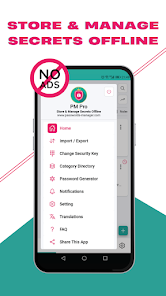
Passwords-Manager-PRO is a 100% offline password lock app that enables users to store, organize, and manage their passwords, keep notes and other sensitive information locally on their devices without relying on cloud-based services.
Highly Secure Offline Passwords Manager Application:
This application is 100% offline without even having the internet connection in this application. It stores data only on the user's device and encrypts it using AES-256 bit encryption, ensuring high security and privacy.
Multiple Login Types:
The application offers users the flexibility to choose from three different login types: Pattern, Passwords, and Biometric.
Malicious Login Detection:
The app locks itself temporarily for a specified period of time after multiple failed login attempts, protecting against unauthorized access and brute-force attacks.
Category-wise Data Organization:
The application offers a hierarchical organization system, allowing users to categorize their data using multi-level categories. This means that users can create nested categories to structure their information effectively. Within these categories, users can store passwords, notes, and other relevant data.
Custom Fields:
The application provides support for an unlimited number of custom fields. These custom fields include Plain Text Box, Passwords Box, Note Box, and even the ability to store Images.
Password Generator:
The application includes a Password Generator tool that assists users in creating highly secure passwords.
Weak & Repeated Passwords Alert:
To enhance password security and assist users in managing their passwords effectively, the application provides a dedicated feature that lists all repeated and weak passwords separately.
Multiple View Types:
The application incorporates a user interface (UI) and user experience (UX) feature that allows users to choose between two different views for displaying their data: tile view or list view.
Multiple Color Themes:
At present, this application provides support for two distinct color themes: "Dark" and "Light." Users have the option to choose between these two themes based on their preference and visual comfort.
Multiple Language Support:
At present, the application provides support for a wide range of languages, surpassing 14 language options.
Export Data:
Since the Passwords Manager application operates entirely offline, transferring data to a new device requires a manual export of their data from the current device and securely stores it somewhere before uninstalling the application.
File Import Data:
Passwords Manager allows users to effortlessly import their passwords from various file formats. Whether it's a Google CSV file, a Passwords Manager (.txt) file, or a Passwords Manager (.csv) file, the application provides the flexibility to import data from other sources.
QR Code Import:
Passwords can be effortlessly transferred between devices by simply scanning a QR code within the application. To initiate the transfer, users can scan the QR code displayed on the source device using the QR code scanning feature within the application.
Bookmark:
The application provides users with the ability to bookmark their most frequently accessed data, enabling quick and convenient access whenever needed..
Auto Logout Application:
This functionality ensures that if the application is left unattended or unused for a specified period, it will automatically log out to protect sensitive information from unauthorized access.
Unlimited Access:
The application operates on a one-time payment model, providing users with lifetime access and usage without any additional monthly or annual charges.
Clasificación del uso de PM Pro: Password Manager
El rango de uso se basa en el algoritmo de Similarweb que calcula las instalaciones actuales y los usuarios activos durante un periodo de 28 días.
Todas las categorías en
Estados Unidos--
Productividad en
Estados Unidos--
Principales competidores & aplicaciones alternativas
Aplicaciones con una alta probabilidad de ser utilizadas por los mismos usuarios, desde la misma tienda.

Pavlok

LockTrip

Aegis Authenticator - 2FA App

One Key: password manager
 PM Pro: Password Manager VS.
 febrero 25, 2026