

You’ve hit your search limit
Start your free trial to keep exploring full traffic and performance insights.
Get StartedAnálisis de la app Epson iProjection para 5 de abril

Epson iProjection
- Seiko Epson Corporation
- Google Play Store
- Gratis
- Productividad
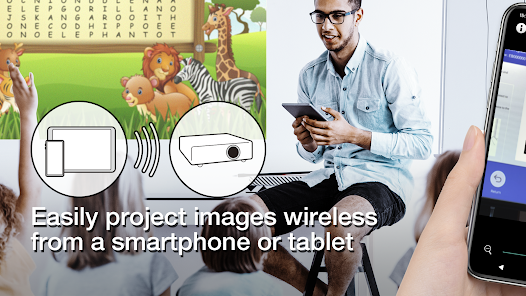
Epson iProjection is a wireless projection app for Android devices & Chromebooks. This app makes it easy to mirror your device's screen and project PDF files and photos wirelessly to a supported Epson projector.
[Key Features]
1. Mirror your device’s screen and output your device’s audio from the projector.
2. Project photos and PDF files from your device, as well as real-time video from your device's camera.
3. Easily connect your device by scanning a projected QR code.
4. Connect up to 50 devices to the projector, display up to four screens simultaneously, and share your projected image with the other connected devices.
5. Annotate projected images with a pen tool and save the edited images on your device.
6. Control the projector like a remote control.
[Notes]
• For supported projectors, visit https://support.epson.net/projector_appinfo/iprojection/en/ . You can also check "Supported Projectors" in the app's support menu.
• The JPG/JPEG/PNG/PDF file types are supported when projecting using "Photos" and "PDF".
• Connecting using a QR code is not supported for Chromebooks.
[About the Mirroring Feature]
• The Chrome extension “Epson iProjection Extension” is required to mirror your device screen on Chromebook. Install it from the Chrome Web Store.
https://chromewebstore.google.com/detail/epson-iprojection-extensi/odgomjlphohbhdniakcbaapgacpadaao
• While mirroring your device’s screen, video and audio may be delayed depending on the device and network specifications. Only unprotected content can be projected.
[Using the App]
Make sure that the network settings for the projector have been completed.
1. Switch the input source on the projector to "LAN". Network information is displayed.
2. Connect to the same network as the projector from "Settings" > "Wi-Fi" on your Android device or Chromebook*1.
3. Start Epson iProjection and connect to the projector*2.
4. Select and project from "Mirror device screen", "Photos", "PDF", "Web Page", or "Camera".
*1 For Chromebooks, connect the projector using the infrastructure mode (Simple AP is turned off or Advanced connection mode). Also, if a DHCP server is being used on the network and the Chromebook's IP address is set to manual, the projector cannot be searched for automatically. Set the Chromebook's IP address to automatic.
*2 If you cannot find the projector you want to connect to using automatic search, select IP Address to specify the IP address.
[App permissions]
The app requires the following permissions for specific features.
【Optional】 Camera
- Scan a connection QR code or project the camera image to the projector.
【Optional】 Recording
- Transfer device audio to the projector during mirroring
【Optional】 Display over other apps
- Display this app's screen in the foreground on the device during mirroring.
【Optional】 Notifications (Android 13 or later only)
- Display notifications indicating that a connection or mirroring is in progress.
* You can use the app without granting the optional permissions, but some features may not work.
We welcome any feedback you have that could help us to improve this app. You can contact us through "Developer contact". Please note that we cannot reply to individual inquiries. For inquiries regarding personal information, please contact your regional branch described in the Privacy Statement.
All images are examples and may differ from the actual screens.
Android and Chromebook are trademarks of Google LLC.
QR Code is a registered trademark of DENSO WAVE INCORPORATED in Japan and other countries.
Clasificación del uso de Epson iProjection
El rango de uso se basa en el algoritmo de Similarweb que calcula las instalaciones actuales y los usuarios activos durante un periodo de 28 días.
Todas las categorías en
Estados Unidos--
Productividad en
Estados Unidos#1,398
Intereses de los usuarios & Top categorias
Principales categorías y aplicaciones utilizadas por los usuarios de Epson iProjection.
Categorías principales
Afinidad
Principales aplicaciones de la categoría
Más aplicaciones
21%






16%



9%




8%



Principales competidores & aplicaciones alternativas
Aplicaciones con una alta probabilidad de ser utilizadas por los mismos usuarios, desde la misma tienda.

Send Anywhere (File Transfer)
Brother Mobile Connect

ScreenMaster:Screenshot Markup

Smart Connect
Epson iProjection VS. abril 5, 2026