

You’ve hit your search limit
Start your free trial to keep exploring full traffic and performance insights.
Get StartedAnálisis de la app Floating Clock On Screen para 23 de febrero

Floating Clock On Screen
- Expressway Apps
- Google Play Store
- Gratis
- Herramientas
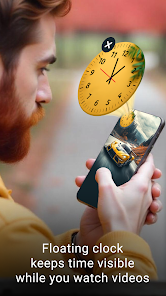
Floating Clock On Screen helps you manage time efficiently with always-visible floating tools. Display a digital clock, analog clock, world clock, timer, stopwatch, and alarm as movable overlays above all apps. Designed for multitasking, productivity, gaming, study, and daily time tracking.
⏰ Floating Clock Overlay ⏰
• Always-on-screen clock display
• Always visible on top of other apps
• Simple enable / disable toggle
• Lightweight floating widget
🕒 Digital Floating Clock 🕒
• Real-time digital clock overlay
• Current date & time zone display
• Optional seconds view
• Battery percentage indicator
• 12-hour or 24-hour format
• Custom time & date formats
• Manual time zone selection
🎨 Clock Customization 🎨
• Adjustable text size
• Padding & rounded corners
• Font color & background color
• Multiple font styles
• Floating backgrounds:
▸ Camera image capture
▸ Gallery image selection
▸ Built-in clock themes
🕰️ Analog Floating Clock 🕰️
• Classic analog clock widget
• Movable floating clock overlay
• Hour & minute hand color control
🖼️ Background Options 🖼️
• Solid background colors
• Pre-designed clock themes
• Camera & gallery image backgrounds
🌍 World Floating Clock 🌍
• World clock overlay for global time tracking
• Add multiple country clocks
• Each floating clock shows selected time zone
• Ideal for travel, business & remote work
⚙️ Customization ⚙️
• Font color & hand color
• Time zone selection
• Custom background images & themes
⏳ Floating Timer ⏳
• Countdown timer overlay
• Works without closing other apps
• Set timer duration easily
⏱️ Display Options ⏱️
• Show or hide hours
• Show or hide milliseconds
🎨 Style Controls 🎨
• Text size & padding
• Rounded corners
• Font & background colors
• Multiple font styles
⏱️ Floating Stopwatch ⏱️
• Accurate stopwatch overlay
• Stays visible while using other apps
• Ideal for workouts, study & productivity
⚙️ Display Options ⚙️
• Show or hide hours
• Show or hide milliseconds
• Custom fonts & colors
⏰ Floating Alarm ⏰
• Floating alarm notifications
• Simple alarm management
🛎️ Alarm Setup 🛎️
• Alarm name
• Time & date selection
• Repeat day options
• Custom ringtone
📋 Alarm History 📋
• View saved alarms
• Edit or delete anytime
🎨 Alarm Display 🎨
• Text size & padding
• Rounded corners
• Font & background colors
• Multiple font styles
🔐 Permission Disclosure 🔐
• SYSTEM_ALERT_WINDOW
Used only to display floating clock, timer, and alarm overlays on top of other apps.
No personal data is collected, stored, or shared.
Never lose track of time again. With always-on-screen clocks, floating timers, stopwatches, and alarms, you can multitask smarter, work faster, and stay organized all day with a smooth, customizable experience ⏱️
Clasificación del uso de Floating Clock On Screen
El rango de uso se basa en el algoritmo de Similarweb que calcula las instalaciones actuales y los usuarios activos durante un periodo de 28 días.
Todas las categorías en
Brasil--
Herramientas en
Brasil#1,884
Intereses de los usuarios & Top categorias
Principales categorías y aplicaciones utilizadas por los usuarios de Floating Clock On Screen.
Categorías principales
Afinidad
Principales aplicaciones de la categoría
31%


12%



11%



9%



Principales competidores & aplicaciones alternativas
Aplicaciones con una alta probabilidad de ser utilizadas por los mismos usuarios, desde la misma tienda.
The Clock: Alarm Clock & Timer

Atto - Time Clock & Scheduling

MultiTimer: Multiple timers

Clock Phone 16, Alarm & Timer
 Floating Clock On Screen VS.
 febrero 23, 2026