

You’ve hit your search limit
Start your free trial to keep exploring full traffic and performance insights.
Get StartedAnálisis de la app GRBL BLK Watch Face para 26 de febrero

GRBL BLK Watch Face
- Grubel
- Google Play Store
- Pagado
- Personalización
For Wear OS
Features:
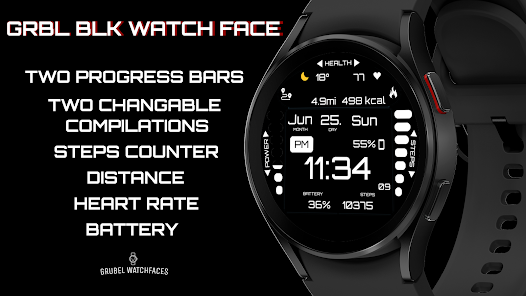
1. Supports AM/PM and 12H/24H format
2. Steps counter
3. Hour with seconds
4. Date
5. Always on display with all complications visible
6. Two changeable complications (1. mainly designed for weather widget)
7. Two bars for steps progress and battery status
8. Distance (!!! KM when 24H format is on, MI whe 12H format is on!!!)
9. Calories
10. Heart rate (measured every 10 min., tap to open HR app)
!!!Calroies and distance are counted based on the steps made. Those complications don't take data from any app!!!
PLEASE KEEP IN MIND THAT THE COMPANION APP DOESN'T INSTALL WATCHFACE ON THE WATCH. PLEASE READ INSTRUCTIONS BELOW.
There are two ways to install this watchaface on Wear OS
From PLAY STORE APP:
1. Use the drop-down menu and select the target
device on the PLAY STORE APP:
after a few minutes the watch face will transferred on
watch.
2- ACTIVATE WATCH FACE:
Once installed, you need to activate the watch face.
Long press screen, swipe left and tap "ADD WATCH
FACE" to activate it.
From PLAY STORE WEBSITE:
1 - Go to the watch face link through a Web Browser on
PC / Mac such as Chrome, Safari (etc.). You can search
the watch face name on Play Store.
Click on "Install on more devices" and select the target
device:
after a few minutes the watch face will transferred on
watch.
2- ACTIVATE WATCH FACE:
Once installed, you need to activate the watch face.
Long press screen, swipe left and tap "ADD WATCH
FACE" to activate it.
Please keep in mind that any issues on this side are
not caused by the developer/watchface. I have no
control over Google's issues.
Before drop a negative feedback (1 star) on Play Store
for these reasons, please read the guide carefully or
contact me:
grubel.watchfaces@gmail.com
for API 24+
Remember , if you want your watch to show phone's battery status, you should install Phone Battery Complication app
Designed for WearOS, Wear OS
Feature Graphic Image by vecstock on Freepik
Clasificación del uso de GRBL BLK Watch Face
El rango de uso se basa en el algoritmo de Similarweb que calcula las instalaciones actuales y los usuarios activos durante un periodo de 28 días.
Todas las categorías en
Estados Unidos--
Personalización en
Estados Unidos--
Principales competidores & aplicaciones alternativas
Aplicaciones con una alta probabilidad de ser utilizadas por los mismos usuarios, desde la misma tienda.

A440 Digital Health Face

HMKWatch Digital 050

EXD107: Digital Watch Face

SG-99
 GRBL BLK Watch Face VS.
 febrero 26, 2026