

You’ve hit your search limit
Start your free trial to keep exploring full traffic and performance insights.
Get StartedAnálisis de la app Magnifier Camera (Magnifying G para 19 de abril
Magnifier Camera (Magnifying G
- JK.Fantasy
- Google Play Store
- Gratis
- Productividad
Please watch the teach video to know how to use it.
Magnifier + Flashlight (best lighted magnifying glass app for free)
Let your phone become a perfect smart magnifier or smart microscope.
Handy!
Easy to see small text.
Open flashlight when start APP.
You can also use it as a simple version of the skin quality check device. (Skin detector)
[Quick Magnifier Camera Guideline]
When you start camera, the APP will set the magnifier zoom to middle value. You can drag zoom seek bar to let magnifier zoom in/out. (Or use two fingers to let magnifier zoom in/out)
When you start camera, the APP will auto detect the micro focus mode. If it exist, the APP will auto set to micro focus mode. If it doesn't exist, the APP will set to auto focus mode.
You can use the following method to change other settings:
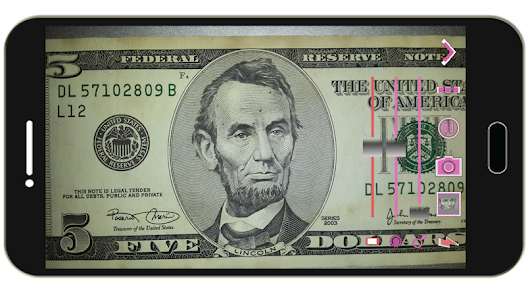
1. Press preview Region to focus.
2. Drag red seek bar to change screen brightness.
3. Drag pink seek bar 1 to change camera exposure.
4. Drag pink seek bar 2 to let magnifier zoom in/out. (Or use two fingers to let magnifier zoom in/out on preview screen)
5. Press the flashlight button to enable flashlight.
6. Press the pause/resume button to pause/resume preview. (freeze image) Then double click the freeze image to let magnifier zoom in/out. (Or two fingers to let magnifier zoom in/out)
7. [Volume Key] : Use volume-down key to pause/resume preview. (freeze image) Use volume-up key to do camera capture. You can change other option in the camera settings page.
[Others]
1. You also can take a picture if you wish.
2. When focus, the focus area of the image please select the best color change much. If you click on the region are biased in favor of a single color, it is not very good focus. In addition, the lens remains clear, wipe clean the glass will be better focus. And turn on the flashlight also can get a better focus.
3. When camera focus, please don't let the camera's lens be too close to an object. It may be unable to focus. (According to the camera's focal length will vary)
【Recommended External Photo Editor】
( Line Camera )
https://play.google.com/store/apps/details?id=jp.naver.linecamera.android
This APP is now tested more compatible. They support external photo edit more user friendly.
Or you can use system photo editor, it also work. (Test on Samsung Phones.)
【PS】
Please like us on Facebook. Give us the power of love.
https://www.facebook.com/jkfantasy
Clasificación del uso de Magnifier Camera (Magnifying G
El rango de uso se basa en el algoritmo de Similarweb que calcula las instalaciones actuales y los usuarios activos durante un periodo de 28 días.
Todas las categorías en
Estados Unidos--
Productividad en
Estados Unidos#3,424
Intereses de los usuarios & Top categorias
Principales categorías y aplicaciones utilizadas por los usuarios de Magnifier Camera (Magnifying G.
Categorías principales
Afinidad
Principales aplicaciones de la categoría
15%



12%


12%


12%



Principales competidores & aplicaciones alternativas
Aplicaciones con una alta probabilidad de ser utilizadas por los mismos usuarios, desde la misma tienda.

Photo Scan App by Photomyne

ieGeek Cam
Color Grab (color detection)

eZy Watermark Photos Classic
 Magnifier Camera (Magnifying G VS.
 abril 19, 2026