

You’ve hit your search limit
Start your free trial to keep exploring full traffic and performance insights.
Get StartedAnálisis de la app Boomerang Parental Control para 21 de abril

Boomerang Parental Control
- National Education Technologies Inc.
- Google Play Store
- Gratis
- Herramientas
Boomerang Parental Control: The Ultimate Screen Time and Safety Solution
Empower your child’s digital wellbeing with Boomerang Parental Control, the comprehensive app for managing screen time, blocking inappropriate content, and keeping your family safe. Transform daily tech battles into healthy habits with the most robust parental control tools available for Android.
SMART SCREEN TIME MANAGEMENT
Stop the cycle of constant screen time negotiations. Set firm but flexible boundaries that work for your family:
· Daily Time Limits: Set a total allowance for device use each day.
· Schedules and Downtime: Automatically lock devices during bedtime, school hours, or homework time.
· Per-App Limits: Set individual timers for specific apps like social media or streaming services to encourage a balanced digital diet.
APP CONTROL AND APPROVAL
Take charge of what apps are allowed on your child's device before they are even used:
· App Blocker: Instantly approve or block new app installations from the Play Store.
· New App Alerts: Receive a notification the moment your child tries to download a new app.
· Encourage Educational Apps: Set learning, math, or reading apps to "Always Allowed" so they do not count against daily screen time limits.
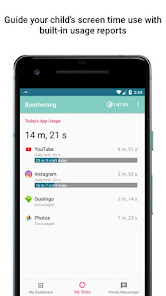
· Usage Insights: Monitor exactly how much time is spent on games vs. educational tools.
WEB SAFETY AND FILTERING
Do more than just monitor; actively protect your child’s browsing. Boomerang includes our built-in SPIN Safe Browser technology:
· Automatic SafeSearch: Enforce Google SafeSearch and block millions of inappropriate websites by default.
· Advanced Web Filtering: Unlike many other parental control apps, we block all other web browsers to ensure your child cannot bypass your filters.
REAL-TIME LOCATION AND GEOFENCING
Know your children are safe, even when they are not at home:
· Family Locator: View your child’s current device location on a private, secure map.
· Geofence Alerts: Receive instant notifications when your child arrives at or leaves specific locations like school or home.
· Location History: Review where they have been with a detailed 30-day location history.
YOUTUBE AND APP MONITORING
Stay informed about their interests without being intrusive:
· YouTube History: See exactly what your child searched for and watched inside the YouTube app
· Review YouTube history visited via Chrome or SPIN Safe Browser
WHY PARENTS CHOOSE BOOMERANG
Boomerang is designed to help parents nurture a healthy digital environment. We focus on providing the data you need to have meaningful conversations with your kids about their digital footprint and online safety.
IMPORTANT TECHNICAL NOTES:
* This app uses the Device Administrator permission and AccessibilityService API to perform key functions such as screen time enforcement and app controls.
* Samsung Knox: Exclusive integration for Samsung devices to enhance security and management capabilities.
* Notification Access: Required to mute notifications when screen time has expired.
* System Requirements: Supports Android 9.x and higher.
Clasificación del uso de Boomerang Parental Control
El rango de uso se basa en el algoritmo de Similarweb que calcula las instalaciones actuales y los usuarios activos durante un periodo de 28 días.
Todas las categorías en
Estados Unidos--
Herramientas en
Estados Unidos#1,306
Intereses de los usuarios & Top categorias
Principales categorías y aplicaciones utilizadas por los usuarios de Boomerang Parental Control.
Categorías principales
Afinidad
Principales aplicaciones de la categoría
Más aplicaciones
16%



15%


10%





8%





Principales competidores & aplicaciones alternativas
Aplicaciones con una alta probabilidad de ser utilizadas por los mismos usuarios, desde la misma tienda.

Spoked: AI Cycling Coach

blockit | stop phone addiction

Control+

Barre Teja
Boomerang Parental Control VS. abril 21, 2026