

You’ve hit your search limit
Start your free trial to keep exploring full traffic and performance insights.
Get StartedAnálisis de la app airScan: Documents Scanner app para 1 de marzo

airScan: Documents Scanner app
- airSlate, Inc.
- Google Play Store
- Gratis
- Productividad
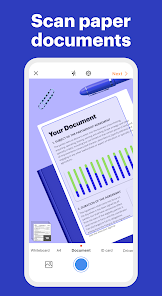
Forget about piles of paper. Use airScan, a free scanner app, to capture your current documents with a camera and scan them to PDFs. With airScan’s automatic text recognition, you can edit, save, or share documents right from your mobile device.
With the airScan mobile app, you've got a smart PDF scanner and PDF editor in the palm of your hand. Here’s what it has to offer:
✅ High-quality document scanner
✅ A variety of file formats
✅ Text recognition in 8 languages
✅ Scanner & PDF editor combined in one app
✅ Legally-binding eSignatures
✅ Document sharing options
✅ Ability to print out your doc from the app
✅ Access to the PDF scanner free
Let's dive deeper and explore its capabilities.
Digitize your most-used documents
Take your most important documents with you, no matter where life leads. With the smart cam scanner in your pocket, you no longer need to carry around your ID, passport, or driver's license. Use your smartphone's camera and scan to PDF in a snap.
Convert documents to a variety of file formats
airScan is more than just a PDF-scanner. It has a built-in file converter so you can easily turn your most-used documents, from contracts to business letters and invoices, into PDFs, DOCS XLS spreadsheets, or PPT presentations — all with one app. Scan to PDF free and then get your document in the format you need.
Create pixel-perfect scans
Produce document scans that look like they were printed from a doc. Make dull scans more vibrant and easier to read with a few simple tweaks. Adjust the contrast and brightness levels, and add some black or white colors with filters to make your document scan ready for sharing.
You can also clean up any unwanted text or shadows that might be lingering in the background — just crop them away until you have exactly what you need.
Leverage automated text recognition
airScan recognizes text to give you even more flexibility with your scannable document. Once the text is recognized, select specific paragraphs or copy an entire page and paste it into another document. You can also send out your scan as is in just a few taps.
Sign documents in a snap
Skip the endless hassle of printing, signing, and scanning documents. airScan acts as a PDF signer, allowing you to add personalized, legally-binding eSignatures to your documents. Simply draw your signature on your device’s screen and add it anywhere on a document with a single tap.
Send documents via email
Our paper scanner makes document sharing a breeze. When you’ve finished making edits, email your scan without having to switch apps. Your recipients will get a high-quality PDF that they can start working on in seconds.
Print out your scans without the back and forth
Need a hard copy fast? No problem. Now you can print your docu scan right from our camscanner app with a few quick taps. Sign off on your scan before printing and it's good to go.
Build fillable forms and signature workflows
Our mobile scanner easily connects to PDF filler, an online document editor. pdfFiller is a PDF expert that empowers users with everything they need to create, edit and sign PDFs, build and share fillable forms, and securely store documents within a single, easy-to-use application. With a library of over 30 million forms, pdfFiller lets you search for the form you need, modify it to fit your needs, and share it with others directly, via social media or embed it on a website. Check out pdfFiller's subscriptions and pick one that works for you.
Clasificación del uso de airScan: Documents Scanner app
El rango de uso se basa en el algoritmo de Similarweb que calcula las instalaciones actuales y los usuarios activos durante un periodo de 28 días.
Todas las categorías en
Estados Unidos--
Productividad en
Estados Unidos--
Intereses de los usuarios & Top categorias
Principales categorías y aplicaciones utilizadas por los usuarios de airScan: Documents Scanner app.
Categorías principales
Afinidad
Principales aplicaciones de la categoría
Más aplicaciones
41%




30%



14%





9%


Principales competidores & aplicaciones alternativas
Aplicaciones con una alta probabilidad de ser utilizadas por los mismos usuarios, desde la misma tienda.

NoteLedge - Digital Notebook

Passport Photo Easy - SG

Sentenceify: My Text Converter

SynkedUP
airScan: Documents Scanner app VS. marzo 1, 2026