

You’ve hit your search limit
Start your free trial to keep exploring full traffic and performance insights.
Get StartedAnálisis de la app Gravity Screen - On/Off para 28 de marzo
Gravity Screen - On/Off
- Plexnor
- Google Play Store
- Gratis
- Herramientas
It turns automatically the screen off when you put your phone into your pocket or onto a table. And turns the screen on when you take it out or up. No need to touch any button and you are ready to go. It's especially helpful if your lock key is hard to reach or the power button is broken.
The most popular screen on/off app. Reviewed by LifeHacker, MakeUseOf, TheNextWeb, Gizmodo and many others ...
WARNING:If the app is killed by the OS after some time visit: https://dontkillmyapp.com/
KEY FEATURES
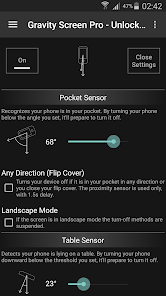
• Pocket Sensor: Turns the screen off if your phone is in your pocket.
• Table Sensor: Detects your phone is lying on a table and turn it off if not in use.
• Turn Screen On by Motion: If the screen is off and it's facing up the device can be woken up by moving it.
• Keep Screen On by Motion - Rise to Wake: It keeps the screen on while you are watching the screen. It relies on the small movements of your hand while holding the device.
• Smart Lock support: It's a workaround to make the Smart lock feature work fine on devices with Lollipop.
• Locale plug-in for: Tasker, Llama and others
UNLOCKED by IN-APP PURCHASE
• Better performance
• Widgets, Shortcuts
• Wider range for Rise to Wake Timeout
• Wider range for Table Sensor
• Suspend in Landscape mode
• Exclude Apps option
BATTERY USAGE
It should be not significant. I experienced about 6 per cent extra consumption on the test device. However it can be much higher by often using the Rise to Wake feature. Thus, keep your phone face down if you want to save energy.
UNINSTALL
Please, use the Uninstall button in the app. Due to Android restriction the app cannot be uninstalled on a normal way.
FAQ: http://goo.gl/D4BgQ5
This app uses the Device Administrator permission.
This app uses Accessibility services.
Clasificación del uso de Gravity Screen - On/Off
El rango de uso se basa en el algoritmo de Similarweb que calcula las instalaciones actuales y los usuarios activos durante un periodo de 28 días.
Todas las categorías en
Estados Unidos--
Herramientas en
Estados Unidos#6,997
Intereses de los usuarios & Top categorias
Principales categorías y aplicaciones utilizadas por los usuarios de Gravity Screen - On/Off.
Categorías principales
Afinidad
Principales aplicaciones de la categoría
14%


14%

12%
10%


Principales competidores & aplicaciones alternativas
Aplicaciones con una alta probabilidad de ser utilizadas por los mismos usuarios, desde la misma tienda.

Touch Screen Test

TAP Kiln Control Mobile

Macrorify - Image Auto Clicker

Taskbar
 Gravity Screen - On/Off VS.
 marzo 28, 2026