

You’ve hit your search limit
Start your free trial to keep exploring full traffic and performance insights.
Get StartedAnálisis de la app TasmotaRemota para 27 de febrero

TasmotaRemota
- RobTech
- Google Play Store
- Gratis
- Herramientas
OVERVIEW A simple and elegant way to control and modify your compatible Tasmota devices on your LAN. Find them, group them, place them in scenes, name them, edit them, add photos, set their timers and control them easily.
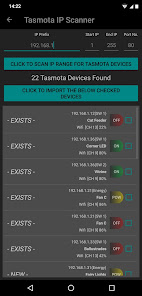
TASMOTA DEVICE SCANNER If the username and passwords are common to all your Tasmota devices, enter them in the SETTINGS and TASMOTA DEVICE SCANNER can be used to quickly scan the local network for Tasmota devices. Once found, devices can be imported into a group.
Each device switch and sensor is treated as an individual device, these can be added in groups as needed.
GROUPS Each group has a separate screen. The group screen can be selected by side swiping or from the group tabs. A group contains a defined selection of devices.
The GROUP MENU can be accessed by clicking on the dots icon on the group title thumbnail.
DEVICES. Each device represents a relay, switch, or sensor on the physical Tasmota device. If a device has multiple relays, switches or sensors, these are listed as individual "devices" in TasmotaRemota.
The DEVICE ICON MENU can be accessed by clicking the dots icon on the device thumbnail.
A normal click on the device status area will toggle the power.
GROUP MENU
- Turn on or off all devices in a group simultaneously.
- Disable all devices in the group.
- Manually add new devices to a group.
- Edit group names and colors.
- Rearrange groups by swapping adjacent groups.
DEVICE ICONS MENU
- Edit device details.
- Delete device.
- Change device timers - see below for details.
- Set "PulseTime" for the switched device. (AutoSwitch-off after set period)
- Access UI WEBSERVER TASMOTA
DEVICE TIMERS Tasmota provides 16 individual timers per device, in TasmotaRemota these are visualized graphically on a WEEK PLANNER, this simplifies setting task and changing timers.
Check the boxes according to your required timer setting.
Click on the time to modify.
Click the "+" to switch to "-" for time setting.
Once the timers are set on the WEEK PLANNER as desired, these can be sent to the Tasmota device.
SCENES All switchable devices are automatically included in Scenes and can be preset to ON/OFF/Override and then activated as a group.
EXPORT/IMPORT DATA - Export app data to local save folder.
- Export app data to selected folder (e.g. Google Drive, etc.).
- Send email or move app data.
- Import app data from local backup folder.
- Import app data from Android download folder.
This app is not ad-supported.
Basic or Premium? Premium version includes 16 device groups, 10 scenes and all 16 timers can be saved, sorting by DRAG/DROP, access to power graphs and interface Tasmota WebServer user.
The basic version has 2 device groups, 2 scenes and only timer 1 can be saved.
Premium upgrade is an in-app purchase of £2.19 (GBP or equiv in your currency), it is a once only cost. All future improvements will be automatically included at no extra cost.
Clasificación del uso de TasmotaRemota
El rango de uso se basa en el algoritmo de Similarweb que calcula las instalaciones actuales y los usuarios activos durante un periodo de 28 días.
Todas las categorías en
Alemania#7,573
Herramientas en
Alemania#1,173
Intereses de los usuarios & Top categorias
Principales categorías y aplicaciones utilizadas por los usuarios de TasmotaRemota.
Categorías principales
Afinidad
Principales aplicaciones de la categoría
Más aplicaciones
22%






11%



10%





8%





Principales competidores & aplicaciones alternativas
Aplicaciones con una alta probabilidad de ser utilizadas por los mismos usuarios, desde la misma tienda.

Vimar Products

Airthings

Coolina

Infobric Field
TasmotaRemota VS. febrero 27, 2026