

Análisis de la app Voice Commands for Cortana para 13 de abril

Voice Commands for Cortana
- SDE Dev Team
- Google Play Store
- Gratis
- Herramientas
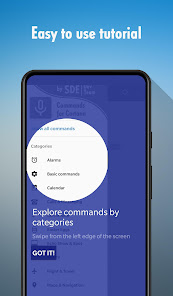
Discover all Cortana voice commands for voice control, say "Hey Cortana" and do things by just commanding with your voice! Find Microsoft Cortana Assistant commands and phrases in this easy to understand guide and try them right away! All voice commands are divided in catergories! Everything you can say to to your Windows computer is presented to you as a guide of about 20 categories of useful and powerful voice actions and commands for the Cortana app. By saying Hey Cortana, you can control your PC with help of Cortana Asisstant (please note that this app isnt Microsoft Cortana app itself!).
Discover commands, see possible examples, understand the usage of over 250 hands-free actions (commands) you can say to Microsoft Cortana Assistant in your Windows device and find them in just a few taps! Everything you may ask your Windows device to do, from Search and Calendar, to Alarms and fantastic Easter Eggs are presented to you in the most intuitive and beautiful way in this full Cortana Voice Commands guide.
With these hands-free commands, you will be able to use your Windows computer without touching it, which is awesome. For example, you can use a Windows computer while cooking or during morning workouts! Just control your device with speech, pronouncing voice commands you find in our application!
Please note that this app is just a GUIDE for Microsoft Cortana! All voice interaction and intelligent answers are powered by Microsoft Corporation.
With Microsoft Cortana you can:
• Set alarms
• Make appointments
• Control your PC
• Create events in Calendar / Agenda
• Set reminders
• Check weather
• Translate
• Play music
• Search for any kind of information
• Ask for directions, start navigation e.t.c.
And many, many more, all with just your voice and without touching your Windows PC!
Please note that you will need the Microsoft Cortana enabled in your Windows Settings. After that you are free to enjoy it.
All phrases and actions have been successfully tested, but their availability depends on your country and Widnows version. More languages coming soon!
The program is a guide to all voice comamnds which can be used with Microsoft Cortana voice search powered by "Microsoft Corporation". The whole action is powered by app named "Microsoft Cortana" inbuilt in Windows 10.
Clasificación del uso de Voice Commands for Cortana
El rango de uso se basa en el algoritmo de Similarweb que calcula las instalaciones actuales y los usuarios activos durante un periodo de 28 días.
Todas las categorías en
Estados Unidos--
Herramientas en
Estados Unidos--
Principales competidores & aplicaciones alternativas
Aplicaciones con una alta probabilidad de ser utilizadas por los mismos usuarios, desde la misma tienda.

Funny Voice Reverse Singing

Ooma Office Business Phone App

AI Chatbot - Daily Assistance

AI! Chatbot Agent-Ask & Chat
 Voice Commands for Cortana VS.
 abril 13, 2026