

You’ve hit your search limit
Start your free trial to keep exploring full traffic and performance insights.
Get StartedAnálisis de la app SystemUI Tuner para 20 de abril

SystemUI Tuner
- Zachary Wander
- Google Play Store
- Gratis
- Personalización
If Night Mode gave you a black screen, run this ADB command:
- adb shell settings delete secure ui_night_mode
READ THIS BEFORE INSTALLING: https://github.com/zacharee/Tweaker/blob/master/app/src/main/assets/terms.md
SAMSUNG USERS ON ANDROID NOUGAT (7) and OREO (8) READ THIS: https://forum.xda-developers.com/showpost.php?p=72413941&postcount=283
Add-on for writing to Settings.System without root or Shizuku: https://zwander.dev/dialog-systemuitunersystemsettingsadd-on
UNLESS YOU ARE ON ANDROID 11 OR HIGHER, USING ADB REQUIRES A COMPUTER!
SystemUI Tuner is not magic! It simply exposes some hidden options in Android. Different manufacturers may remove or change these options, which SystemUI Tuner CANNOT work around.
ADB Commands for more convenient copy-paste (ADB is not root):
- adb shell pm grant com.zacharee1.systemuituner android.permission.WRITE_SECURE_SETTINGS
- adb shell pm grant com.zacharee1.systemuituner android.permission.PACKAGE_USAGE_STATS
- adb shell pm grant com.zacharee1.systemuituner android.permission.DUMP
For some reason, a lot of manufacturers seem to have a problem with us customizing our own devices, to the point where some disable the built-in Android System UI Tuner.
This app aims to fix that problem, by providing a replacement. For the most part, this is a replica of Android's System UI Tuner; however, there are a few extra goodies that Android's solution doesn't include by default.
Using this app you can:
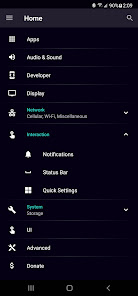
- Control which icons appear in your status bar (not every toggle will work on every device).
- Customize Demo Mode.
- Control the importance level of notifications (7.0+; doesn't work well on Samsung).
- Enable some hidden features of Android.
- Toggle Immersive Mode.
- Change Quick Settings options (TouchWiz 7.0 users can change the grid size).
- Customize animation speeds.
- And so much more.
Most features should work on most devices. Heavily customized OEM versions of Android (such as TouchWiz/Samsung Experience/One UI, EMUI, MIUI, etc) will have fewer available. There is nothing that can be done about this.
THIS APP WILL NOT FUNCTION PROPERLY ON ALL DEVICES! This includes most versions of MIUI, while Samsung's TouchWiz Marshmallow (6) will not work at all!
Now for some notes:
- This app does NOT require ROOT, but you will need to grant some permissions using ADB (instructions in app). ADB IS NOT ROOT!
- If your device is rooted, the app will attempt to gain root access. You can deny access if you want, but you will need to use ADB to grant the permissions.
- This app should work on any device running Android Marshmallow (6.0) or above, except most devices running MIUI and devices on TouchWiz 6.0.
- This app is not a magic wand. SystemUI Tuner is simply exposing hidden options available in Android. If there isn't an option for something, or an existing option doesn't work on your device, there's nothing that I can do to fix it.
- Immersive Mode is finnicky! Don't expect it to work perfectly, and don't expect me to be able to do anything about it. Again, it's an option built into Android. I have no control over what Google or your OEM does to mess it up.
- Changes you make are permanent! Uninstalling SystemUI Tuner WILL NOT and CANNOT undo your changes. On Android Oreo (8.0) and later, there is an option to reset most settings, but it is YOUR responsibility to keep track of what you change.
If you have a problem, visit the XDA thread, send me an email, or visit the Telegram group. However, make sure you read this description and any warnings present in the app before asking a question.
XDA: https://forum.xda-developers.com/android/apps-games/app-systemui-tuner-t3588675
Source code: https://github.com/zacharee/Tweaker
Telegram:
http://bit.ly/ZachareeTG
Help Translate: https://crowdin.com/project/systemui-tuner
Clasificación del uso de SystemUI Tuner
El rango de uso se basa en el algoritmo de Similarweb que calcula las instalaciones actuales y los usuarios activos durante un periodo de 28 días.
Todas las categorías en
Estados Unidos--
Personalización en
Estados Unidos#480
Intereses de los usuarios & Top categorias
Principales categorías y aplicaciones utilizadas por los usuarios de SystemUI Tuner.
Categorías principales
Afinidad
Principales aplicaciones de la categoría
Más aplicaciones
31%






15%



9%





8%



Principales competidores & aplicaciones alternativas
Aplicaciones con una alta probabilidad de ser utilizadas por los mismos usuarios, desde la misma tienda.

Focus Launcher

Action Launcher: Pixel Edition

ISO Today

IFTTT - Automate work and home
SystemUI Tuner VS. abril 20, 2026