

You’ve hit your search limit
Start your free trial to keep exploring full traffic and performance insights.
Get StartedAnálisis de la app Android System Widgets + para 1 de abril

Android System Widgets +
- Benjamin Laws
- Google Play Store
- Pagado
- Productividad
System Widgets Collection – Monitor & Customize Your Phone
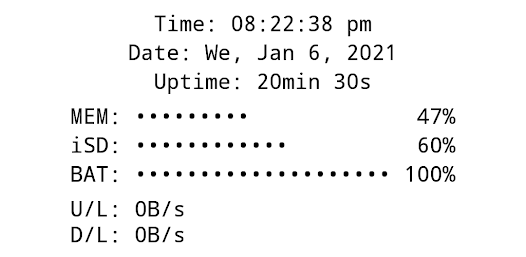
All essential info right on your home screen: Clock, Date, Uptime, RAM, Storage, Battery, Net Speed & Flashlight.
Included Widgets:
🕒 Clock / Date / Uptime
📈 Memory (RAM) Usage – monitor free & used RAM
💾 Storage / SD-Card Usage – available & used space
🔋 Battery – level + NEW: 🌡️ temperature (°C / °F)
🌐 Net Speed – current upload/download speed (NEW: switch Bytes/s ↔ Bits/s)
✨ Multi Widget – combine the above in one customizable widget
Flashlight Widget:
• Auto-off timer (2m, 5m, 10m, 30m, never)
• Choose from 4 flashlight icon sets
(Permission for camera & flashlight is required only to control the LED. The app cannot take pictures!)
Global Settings:
🎨 Font Color – free choice + NEW: color picker with HEX input
🖼️ Background Color – black or white
▓ Custom Characters – for percentage bar display
Widget Configuration Options:
• Background opacity
• Font size
• Percentage bar length & accuracy (or compact mode)
• Alignment of widget content (precise screen positioning)
Tapping Actions:
Tap on most widgets to see more details via toast/notification.
Example:
Internal SD:
753.22MB / 7.89GB
How To (Setup & Troubleshooting):
1. Open the app and adjust widget settings to your needs
2. Add the desired widgets to your home screen
👉 If widgets don’t load right after installation: restart your device or re-install the app.
👉 If widgets show "null" or don’t update: open the app once to initialize and make sure the Keep-Alive Service is enabled in General Settings.
Why Choose System Widgets?
✔️ All-in-one collection (RAM, Storage, Battery, Clock, Network/Internet Speed, Flashlight)
✔️ Highly customizable (colors, opacity, font size, alignment)
✔️ Lightweight, fast & no ads
📲 Get the System Widgets Collection now – make your Android home screen smarter and more useful!
Clasificación del uso de Android System Widgets +
El rango de uso se basa en el algoritmo de Similarweb que calcula las instalaciones actuales y los usuarios activos durante un periodo de 28 días.
Todas las categorías en
Estados Unidos--
Productividad en
Estados Unidos--
Principales competidores & aplicaciones alternativas
Aplicaciones con una alta probabilidad de ser utilizadas por los mismos usuarios, desde la misma tienda.

AppDash: App Manager & Backup

DAVx⁵ – CalDAV CardDAV WebDAV

Sesame Search & Shortcuts

jtx Board | journals & tasks
 Android System Widgets + VS.
 abril 1, 2026