

You’ve hit your search limit
Start your free trial to keep exploring full traffic and performance insights.
Get StartedAnálisis de la app Snipping tool - Screenshot para 22 de febrero

Snipping tool - Screenshot
- Incredible Apps Inc
- Google Play Store
- Gratis
- Herramientas
Snipping tool - Capture screenshot & share image
Introducing first app in Android to capture desired part of screen and share generated image.You can take a screenshot quickly without pressing any hardware button, just one touch for screenshot.
Snipping Tool lets you select which portion of screen you want to take as screen shot.No need to crop or blur your non-essential part of screen,Take screenshot of only highlighted portion of screen and share on the single tap to image.
HIGHLIGHTS
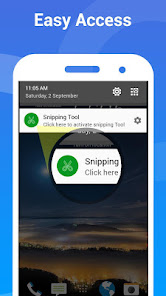
Quick access - Tap Assistive touch (like Facebook chathead) or accessible from notification.
Snip Tool- Use finger to select desired screen portion to take screen shot.
Share Link - App will generate a image of taken screenshot.
Photo Share - You can also share taken snipped photo.
Browse History- You can view and manage all taken screenshot with generated image for later use.
No Root - This app doesn’t need root access.
When you turn the Snipping service ON, a sniphead will appear on your screen that allows you to snip any portion of your screen with just a tap. Once you tap it, the current screen selection mode will be open ,Use your fingers to select portion of screen and release your finger when done. That's about it. You're all set and good to share the piece that you just snipped with anyone as image.
If you have a suggestion, a question or you want to report a bug please use the provided feedback function or contact me directly via email.
Clasificación del uso de Snipping tool - Screenshot
El rango de uso se basa en el algoritmo de Similarweb que calcula las instalaciones actuales y los usuarios activos durante un periodo de 28 días.
Todas las categorías en
Alemania--
Herramientas en
Alemania#3,062
Intereses de los usuarios & Top categorias
Principales categorías y aplicaciones utilizadas por los usuarios de Snipping tool - Screenshot.
Categorías principales
Afinidad
Principales aplicaciones de la categoría
24%




20%


15%

13%

Principales competidores & aplicaciones alternativas
Aplicaciones con una alta probabilidad de ser utilizadas por los mismos usuarios, desde la misma tienda.

ScreenMaster:Screenshot Markup

Sentenceify: My Text Converter

Private Screenshots

Loom – Screen and Cam Recorder
 Snipping tool - Screenshot VS.
 febrero 22, 2026