

You’ve hit your search limit
Start your free trial to keep exploring full traffic and performance insights.
Get StartedAnálisis de la app AppRadio Unchained Rootless para 20 de febrero
AppRadio Unchained Rootless
- Area51 Advanced Technology
- Google Play Store
- Pagado
- Automoción y vehículos
AppRadio Unchained Rootless allows full mirroring of your phone from your AppRadio. This means that any app can be controlled from the head unit screen and not just a few that are specially adapted.
For this app to work Android 7 or higher is required. As Android 7 only allows to inject complete gestures, a gesture has to be completed first on the head unit before it will be dispatched to the phone. It works similar to record and playback. Suppose you need to do a long press of 2 seconds, first press for 2 seconds, once you lift your finger it will be dispatched and replicated on the phone where it will take 2 seconds as well. It's recommended to only do things that take a short time so there won't be too much delay.
Important
The 'Smartphone setup' on the head unit needs to be set correctly for Android as by default it's configured for Iphone. Go to Settings->System->Input/Output Settings->SmartphoneSetup and set Device to 'Others' and Connection to 'HDMI'. See this video: https://goo.gl/CeAoVg
Any other AppRadio related app needs to be uninstalled as this blocks the connection to AppRadio Unchained Rootless.
Android 7 Bluetooth bug
If during connection 'Accept thread error' is displayed this is not because of a bug in the app but due to a bug in Android 7.
It can be fixed by disabling BT background scanning on your phone: Go to Settings -> Location, in top right menu click Scanning -> Bluetooth Scanning.
AppRadio mode requires that your device is connected to the HDMI input of the head unit. Depending on the device this can be done with a MHL / Slimport / Miracast / Chromecast adapter. This app supports automatic connection to wireless screencasting devices. Since Google API doesn't support this directly it is done via the phone's GUI. Note that only the phone's built-in screencasting capabilities can be used.
Chromecast issue
The issue where it was not possible anymore to use a Chromecast with the mobile hotspot of your phone has been resolved by Google. If you still experience this issue make sure that ‘Google Play services’ has version 11.5.09 or higher.
If your phone supports Miracast, it's more convenient to use a Miracast device. It doesn’t require an internet connection to connect to it. The Actiontec screenbeam mini 2 or the Microsoft wireless adapter V2 are good choices.
Because this app may not work for your setup there's an extended trial period of 48 hours. In order to claim this simply request a refund within 48 hours after purchase by emailing the order number to the support email address.
The user's manual is available here: https://bit.ly/3uiJ6CI
Support forum thread at XDA-developers: https://goo.gl/rEwXp8
Supported head units: any AppRadio that supports Android AppMode via HDMI.
For example: SPH-DA100, SPH-DA110, SPH-DA210, SPH-DA120, AVH-X8500BHS, AVH-4000NEX, AVH-4100NEX, AVH-4200NEX, AVIC-X850BT, AVIC-X950BH, AVIC-Z150BH, AVIC-6000NEX, AVIC-6100NEX, AVIC-6200NEX, AVIC-7000NEX, AVIC-7100NEX, AVIC-7200NEX, AVIC-8000NEX, AVIC-8100NEX, AVIC-8200NEX
Units that have AppRadio mode via USB (a.k.a. AppRadio One) are not supported.
The following features are supported:
- Multitouch
- AppRadio buttons
- GPS data transfer via mock locations (only works with head units that have a GPS receiver)
- Wake lock
- Rotation locker (to put any app in landscape mode)
- Real calibration
- Start on HDMI detection (for use with phones and HDMI adapters)
- Notifications to indicate connection state
- Diagnostics
- Automatic Bluetooth toggle for improved connection
AppRadio is a registered trademark of Pioneer.
Disclaimer: You are solely responsible for using this app in such a way that it does not impair your ability to drive.
This app uses Accessibility services.
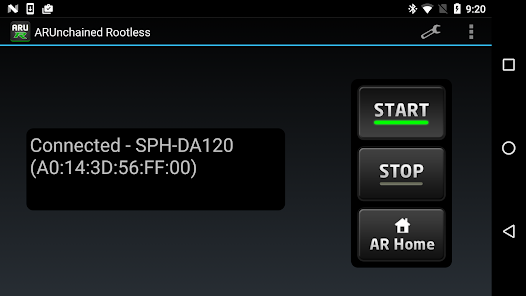
Clasificación del uso de AppRadio Unchained Rootless
El rango de uso se basa en el algoritmo de Similarweb que calcula las instalaciones actuales y los usuarios activos durante un periodo de 28 días.
Todas las categorías en
Estados Unidos--
Automoción y vehículos en
Estados Unidos--
Principales competidores & aplicaciones alternativas
Aplicaciones con una alta probabilidad de ser utilizadas por los mismos usuarios, desde la misma tienda.

Game Booster GFX - No Lag

Componentry

Quietly
 AppRadio Unchained Rootless VS.
 febrero 20, 2026