

You’ve hit your search limit
Start your free trial to keep exploring full traffic and performance insights.
Get StartedAnálisis de la app To-do List & Tasks & Planner para 4 de abril

To-do List & Tasks & Planner
- Todobit
- Google Play Store
- Gratis
- Productividad
TOOLS
- Task Manager
- Goal Planner
- To Do list
- Notepad for notes
- Schedule Constructor
- Reminders
- Calendar
- Organizer
- Calculator
OPPORTUNITIES
- creation of lists and goals
- create a list of tasks, notes and purchases
- creation of schedules (repetitive tasks)
- flexible settings of the deadline for tasks
- fast movement of tasks and notes to another list or goal
- fast movement of tasks to another day
- execute/delete multiple tasks with one click
- automatic and manual sorting of lists
- grouping lists and goals into categories
- color settings for notes and tasks
- set multiple reminders
- quick add panel
- progress towards the goal
- calculation of the amount of expenses and time of the goal
- work without internet connection
- custom task list widget
- status bar on the locked device screen
- backup to Google Drive and device
DETERMINE AND REACH THE GOALS
If the goal has no tasks, then it’s just a dream. A dream without movement is unattainable!
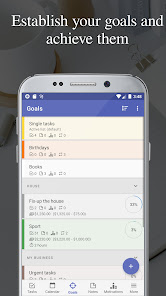
In Todobit, you can create as many goals as you need. And when there are many goals, you can group them into categories.
A goal in Todobit will always show you its current state:
- How many tasks are completed and how many are left.
- How much money and time is needed to solve it, and how much has already been spent.
- The visual progress of its achievement.
- Color, timing and more.
But the most important thing is the simplicity and universality of the goal.
In Todobit, a goal can be a list (folder) for unsorted tasks, or even a notepad for specific notes, or both.
FILL GOALS WITH A TASK LIST
A properly formulated task is 50% of its solution. A goal filled with tasks is already a plan for its implementation and a significant step towards achieving it!
Todobit has a large selection of different tasks: notes, tasks with deadline and without deadlines, tasks with auto completion or auto transfer to another day, recurring tasks - schedules and many other customizable tasks.
Creating tasks in Todobit is easy. After all, this process is most thought out for any situation.
You can add a task to the selected target. You can add several tasks at once on a specific day in the calendar, and then scatter them for specific purposes. You can add a note, and then specify its due date, and it will become a task. And all this can be done both with one task/note, and with several at once, having previously selected them.
Plan your calendar
The solution to any problem takes time. When there are a lot of tasks - planning is necessary!
Todobit's case planner is so flexible that almost everything can!
The application takes into account all the stages of planning - from idea to task at the appointed time.
In Todobit, you can schedule a business for a specific day right in the calendar by selecting the desired date and adding a task for that day.
Moreover, the deadline for the task can be set in any combination of the date and time of the beginning and end.
And yet, you can decide what to do with the task if it expires: complete, transfer to the next day, week or month, or leave it on the list of overdue tasks.
Plan your expenses
An important factor in achieving the goal is the financial costs of it!
In Todobit in any task, you can specify the financial costs. The goal will automatically calculate how much cost has already been realized, and how much is still to be.
Moreover, this opportunity can be used not only for planning purposes, but also used in completely different situations.
For example, creating a list of upcoming purchases or timely reminders of monthly payments.
Together with Todobit your goals will be achievable!
REQUIRED PERMISSIONS
- INTERNET
This permission is required to back up/restore data to Google Drive
- WRITE_EXTERNAL_STORAGE
This permission is required to back up data to your device
- READ_EXTERNAL_STORAGE
This permission is required to restore saved data from your device
Clasificación del uso de To-do List & Tasks & Planner
El rango de uso se basa en el algoritmo de Similarweb que calcula las instalaciones actuales y los usuarios activos durante un periodo de 28 días.
Todas las categorías en
Estados Unidos--
Productividad en
Estados Unidos--
Principales competidores & aplicaciones alternativas
Aplicaciones con una alta probabilidad de ser utilizadas por los mismos usuarios, desde la misma tienda.

FINATEKA

AI Journal: Rewrite your story

Twos: Remember & Share Things

Listok: To do list & Notes
 To-do List & Tasks & Planner VS.
 abril 4, 2026