

You’ve hit your search limit
Start your free trial to keep exploring full traffic and performance insights.
Get StartedAnálisis de la app ScreenMaster:Screenshot Markup para 18 de abril

ScreenMaster:Screenshot Markup
- Blossgraph
- Google Play Store
- Gratis
- Productividad
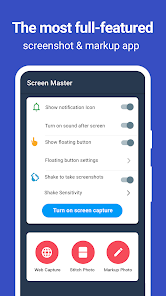
Screen Master is a free, easy-to-use, no rooting required screenshot & photo markup tool. With Screen Master, you can capture screen by touching the floating button or shaking device, lets you take screenshot on your tablet, phone or other Android device the easy way!
Screen Master also provides a variety of annotation features such as crop, add text, pixelated image, draw arrow, rect, circle and more. Lets you easily edit and markup your screenshot and quickly share it with your friends!
► Advantages:
1. No rooting required, No restrictions on use
2. HIGH-QUALITY screenshot, saved without any loss, support PNG format
3. A variety of image annotation features
4. Web page whole capture, quickly save webpage as image
5. Support save screenshot to external SD card
6. Support Android 7.0 Shortcuts and QuickTile features
7. Support long screenshot and stitching photos
► Key Features:
★ Take screenshot:
Screen Master provides a variety of features to take a screenshot
- Floating button: An simple button that is displayed on top of everything, just one-click to take a screenshot
- Shaking device: Shaking your device to take a screenshot
- Web capture: The simplest way to take a full page screenshot of your web page, just share the url to Screen Master
- Long screenshot: Support long screen capture function to easily capture the entire screen
★ Photo Markup:
- Crop and rotate image: can be cut into rectangular, round, star, triangle and other shapes
- Spotlight key info: highlight something with Spotlight
- Blur image: pixelate the image to cover areas you do not want to show
- Magnify image: zoom in your selected section with loupe
- Add emoji sticker: Make your pictures look lively and interesting
- Add text on photo: can be customized text color, background, shadow, stroke, style, size and more
- Annotate picture, all tools you need: Arrow, Rect, Circle, Pen
- Large picture can be directly annotated and do not have to be cropped first
- Not only screenshot but all pictures are supported, you could import photo from gallery, HD save and share with your friends
★ Photo Stitching:
Automatically recognize and stitch multiple photos into a long screenshot, that can be stitched horizontally and vertically
Accessibility Service:
This app uses the accessibility service provided by Android to help you take long screenshots, we will not use the accessibility service to collect and share any data, or take actions that users do not do
► Notice: Screen Master can't capture secure pages, such as Youtube protected content, pages in a banking app, or a password input page
If you have any comments or suggestions on Screen Master, please contact us at blossgraph@gmail.com. We appreciate your feedback!
Clasificación del uso de ScreenMaster:Screenshot Markup
El rango de uso se basa en el algoritmo de Similarweb que calcula las instalaciones actuales y los usuarios activos durante un periodo de 28 días.
Todas las categorías en
Estados Unidos#4,476
Productividad en
Estados Unidos#319
Intereses de los usuarios & Top categorias
Principales categorías y aplicaciones utilizadas por los usuarios de ScreenMaster:Screenshot Markup.
Categorías principales
Afinidad
Principales aplicaciones de la categoría
Más aplicaciones
19%






11%


10%





10%





Principales competidores & aplicaciones alternativas
Aplicaciones con una alta probabilidad de ser utilizadas por los mismos usuarios, desde la misma tienda.

Private Screenshots

ADV Screen Recorder

Screen Recorder Unlimited

Screen Recorder - Vidma REC
ScreenMaster:Screenshot Markup VS. abril 18, 2026