

You’ve hit your search limit
Start your free trial to keep exploring full traffic and performance insights.
Get StartedAnálisis de la app Developer Tools para 25 de febrero

Developer Tools
- Roxanne Crete
- Google Play Store
- Gratis
- Herramientas
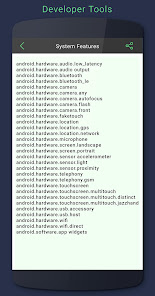
Developer tools is an application for android development assistant, this application is specially designed to improve your developing productivity. this app with you can view of resource qualifiers, View system features, allow to see screen dimensions, view recently used or installed apps, or also appearances like style tools and gradient tools
Developer tools is a powerful app for Android. It allows you to View the following all information
# Resource Qualifiers
_Mcc and MNC
_Language and region
_Layout direction
_Smallest Width
_Available width
_Available Height
_Screen size
_Screen aspect
_Round screen
_Wide color gamut
_HDR
_Screen orientation
_UI mode
_Night mode or also many more
# System Feature: it provides all system features with detail which are available in your mobile device
_Hardware audio output
_Bluetooth
_Camera, autofocus, flash
_FakeTouch
_Fingerprint if it available in the device
_Screen mode
_Sensor or also many more which are related to your mobile device
# Screen Dimensions
_Screen Resolution
_Logical Density
_Font scaled Density
_Density
_Exact density
_Approx size
# Application has also an option to set direct developer feature
# App also allows information of running, installed or also all application which is available in your mobile device
# Also option to set dynamic preview to achieve the results with your desire through appearances like style tools or gradient tools
FEATURES OF Developer tools
_Get detail of resource qualifiers
_Get available system features regarding information
_See screen dimensions
_Allow to set direct developer mode from the device through the app
_Information of all app which is available in your device
_Set dynamic preview to get result with style tools or also with gradient tools
_Go direct to get installed app in the device
_Simple to use application
_Easy to share with anyone
_Clear and convenient User Interface to use the app
Clasificación del uso de Developer Tools
El rango de uso se basa en el algoritmo de Similarweb que calcula las instalaciones actuales y los usuarios activos durante un periodo de 28 días.
Todas las categorías en
Estados Unidos--
Herramientas en
Estados Unidos--
Intereses de los usuarios & Top categorias
Principales categorías y aplicaciones utilizadas por los usuarios de Developer Tools.
Categorías principales
Afinidad
Principales aplicaciones de la categoría
23%



21%

17%


11%


Principales competidores & aplicaciones alternativas
Aplicaciones con una alta probabilidad de ser utilizadas por los mismos usuarios, desde la misma tienda.

QmetaRam AI: Quantum Assistant

Bolt (Dev)

Sentenceify: My Text Converter

Google Automotive Keyboard
 Developer Tools VS.
 febrero 25, 2026