

You’ve hit your search limit
Start your free trial to keep exploring full traffic and performance insights.
Get StartedAnálisis de la app HD Screen Cast to TV para 27 de febrero

HD Screen Cast to TV
- AppsMedia Inc
- Google Play Store
- Gratis
- Productividad
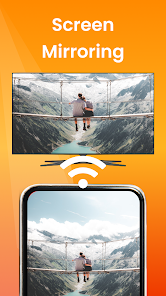
Screen Cast 📲 is a dynamic cast screen app for all your android devices, including tablets. Additionally, you can also use any cast app on Apple devices like iPhones and MacBooks. With this app on your phone, you can cast to tv anything from your device. This screen-mirroring app works in real-time, which means the mirroring will be as smooth as on your phone or laptop.
There will be no lag in casting your android screen on any large screen like a TV or projector. Above all, this smart cast app is fast and easy to use via Chromecast.
Which devices can you use to cast screen?
As mentioned above, this app is not only for screen mirroring for smart TV, but also to cast screen on a projector if and when needed. What does this mean? It means that you can now have a theater-like experience at home by playing any movie or video on your handy device to a projector. 📽️
But on which devices can you use this mirror app?
⭕Android Mobile 📱
⭕I-phone
⭕Windows PC 🖥️
⭕Laptop 💻
⭕Macbook
Besides entertainment, you can also use this screen mirroring app for official purposes, i.e., to make presentations from your mobile, tablet, or laptop to a projector, making it easier for you to control your presentation.
Are there photos from a recent trip that you want all your friends and family to see together? Connect this screen-mirroring app to your smart TV in a couple of steps, and let them all watch the photos together.
Steps to connect the TV cast app
Cast screen from your mobile/laptop to a nearby TV/projector easily by following simple steps.
🎯Install the screen mirroring app on your mobile/laptop/tablet
🎯Connect your device and your TV/projector to the same WiFi or data network
🎯Select Screen Mirroring or Video Projector based on where you want to smart cast on your device
🎯You will see a list of brands- select the brand of your device
🎯Choose between Auto mode and Manual mode
🎯Open the screen mirroring display on the TV and enable it
🎯The app will automatically search for a TV or projector connecting to the internet around you and allow you to pair it with the device
🎯That’s about it- you are now successfully using the mirror app on your devices!
Remember
Before you use screen mirroring for smart TV or projector, ensure you have taken care of the following:
⭕Connect both your devices to an active and same internet connection
⭕Enable Miracast Display on your TV and wireless display option on your phone
Can you use this screen mirror app to smart cast anything?
The answer is, “YES!” No matter what you have on your phone, tablet, laptop, or MacBook, you can cast to TV or projector anything and enjoy sitting back.
You can display
✨Audios
✨Videos
✨Gallery
✨Movies
✨Games
✨And more!
Features of the Screen-mirroring app
This TV cast screen-mirroring app is packed with features that will make your Roku screen mirror experience a worthy one. Here are some features to look out for:-
✨Cast screen in high resolution (subject to internet connectivity)
✨Change resolution density based on your need and requirement
✨Auto-detect available devices like smart TV and projector on your device
✨Lock screen automatically orients to landscape mode
✨ Easy to use and connect
✨Smart control the actions on your mobile, laptop, and tablets, especially when you cast screen during a presentation
✨Use save battery mode when using screen-mirroring by turning off vibration mode on the device
Download the app now and make your screen mirror experience from your device to a smart TV or projector a smooth one!
Note: Latest Projectors to Buy
In the Projector Guide and Screen Cast, we have provided the list as well as the buying links of the best projectors in the market currently. As the technology in this space gets better, we will be updating the list and also providing which projectors are best suited for your needs.
Clasificación del uso de HD Screen Cast to TV
El rango de uso se basa en el algoritmo de Similarweb que calcula las instalaciones actuales y los usuarios activos durante un periodo de 28 días.
Todas las categorías en
Estados Unidos--
Productividad en
Estados Unidos--
Principales competidores & aplicaciones alternativas
Aplicaciones con una alta probabilidad de ser utilizadas por los mismos usuarios, desde la misma tienda.

Travel Journey Video Animation
Timestamp Camera Pro

Funny Voice Reverse Singing

MiX Camera for Mi Camera
 HD Screen Cast to TV VS.
 febrero 27, 2026