

You’ve hit your search limit
Start your free trial to keep exploring full traffic and performance insights.
Get StartedAnalyse de l'application Images To PDF : Photo Editor pour le 21 février

Images To PDF : Photo Editor
- Hardik Dhameliya
- App Store Apple
- Gratuit
- Utilitaires
Images To PDF : Photo Editor
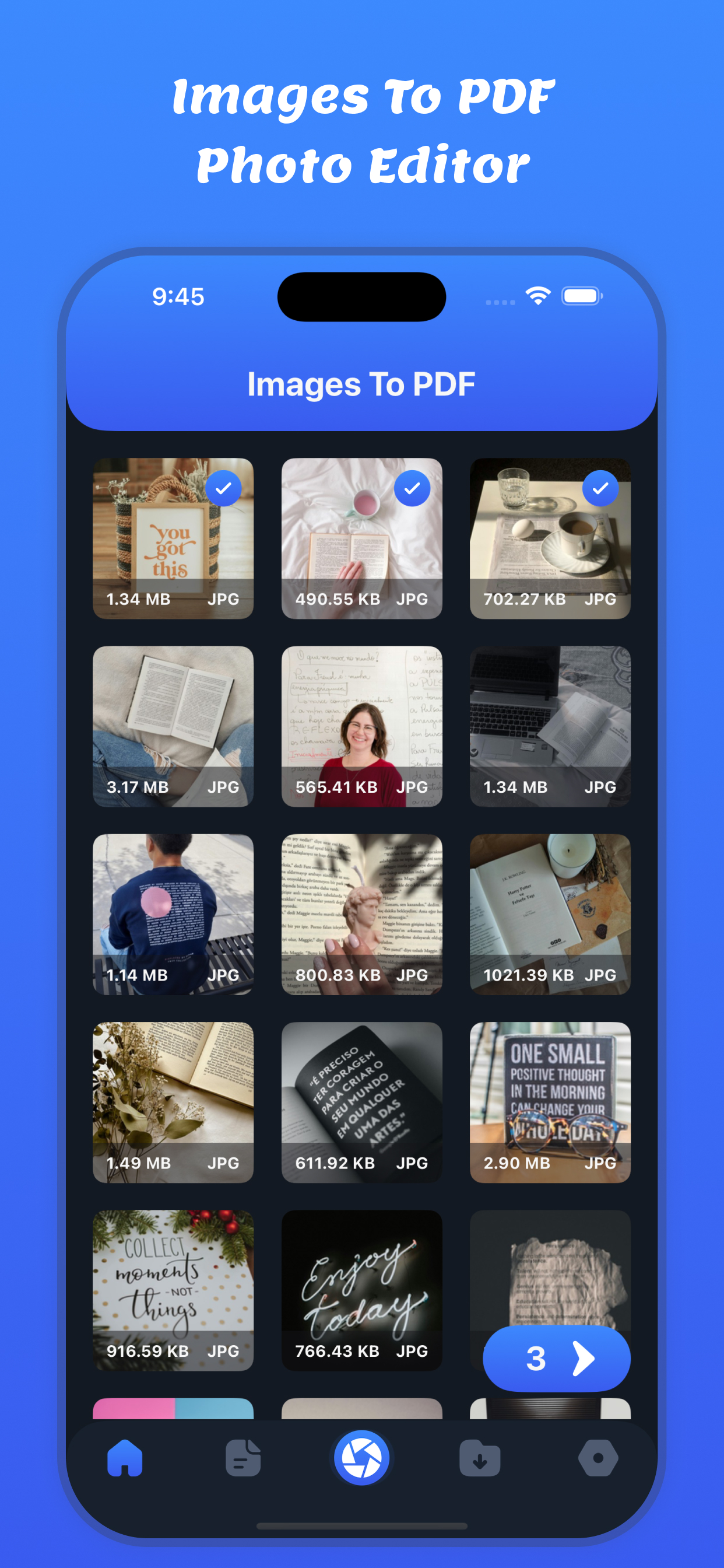
Images To PDF : Photo Editor is a powerful, fast, and easy-to-use iOS app that helps you convert images and photos into high-quality PDF files in seconds. Whether you want to convert JPG to PDF, PNG to PDF, or photos to PDF, this app is the perfect solution for students, professionals, and everyday users.
Turn your iPhone into a smart PDF creator and photo editor. Select images from your gallery, edit them, rearrange pages, and export professional-looking PDF documents instantly.
Key Features
Images to PDF Converter
Convert multiple images into a single PDF file with just one tap. Supports JPG, PNG, and other popular image formats.
Photo to PDF
Easily convert camera photos, screenshots, scanned documents, receipts, notes, and invoices into PDF files.
Powerful Photo Editor
Crop, rotate, resize, and adjust brightness, contrast, and clarity before converting images to PDF.
Multiple Page PDF Creator
Merge multiple photos into one PDF or create separate PDFs for each image.
Reorder & Manage Pages
Drag and drop images to rearrange pages before generating the PDF.
Save & Organize PDFs
Store all converted PDF files in one place. Rename, delete, and manage documents easily.
Share PDFs Anywhere
Share PDF files via email, WhatsApp, AirDrop, cloud storage apps, or any supported sharing option.
Fast & Lightweight
Optimized for speed and performance. Convert images to PDF quickly without compromising quality.
Privacy First
All image to PDF conversions happen locally on your device. Your data is safe and secure.
How It Works:
1. Select Images: Choose photos or images from your iPhone or iPad's gallery or files.
2. Customize: Optionally rearrange, crop, or rotate images before converting.
3. Convert to PDF: Tap the convert button to generate your PDF.
4. Share/Save: Save your PDF to your device, share it with others, or print it directly.
Perfect For
- Students converting notes and assignments to PDF
- Professionals creating PDF documents from images
- Scanning receipts, bills, and invoices
- Creating PDFs from photos and screenshots
- Office, school, and business use
- Anyone needing a reliable photo to PDF converter
Why Choose Images To PDF : Photo Editor?
- Easy to use interface
- High-quality PDF output
- Offline image to PDF conversion
- No complicated steps
- All-in-one photo editor & PDF converter
With Images To PDF : Photo Editor, you can quickly convert photos into professional PDF documents anytime, anywhere. No internet required, no complicated tools — just select images, edit, and convert to PDF instantly.
Download now and experience one of the best Images to PDF & Photo to PDF converter apps on iOS!
Privacy Policy: https://softapps.in/App_Privacy.html
Terms of use: https://softapps.in/App_TOS.html
Classement dans le store
Le classement des stores est basé sur plusieurs paramètres définis par Google et Apple.
Toutes les catégories dans
États-Unis--
Utilitaires dans
États-Unis--
Principaux concurrents & apps alternatives
Applications ayant une forte probabilité d'être utilisées par les mêmes utilisateurs, à partir du même store.

Images to PDFㅤ
Image to PDF - PDF Maker

MergePdf!

.pdf : Photos To PDF Converter
 Images To PDF : Photo Editor VS.
 février 21, 2026