

You’ve hit your search limit
Start your free trial to keep exploring full traffic and performance insights.
Get StartedAnalyse de l'application SignalCheck Pro pour le 27 avril
SignalCheck Pro
- Blue Line Computing
- Google Play Store
- Payant
- Outils
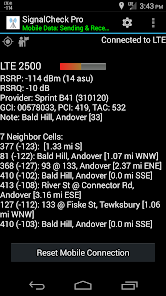
SignalCheck allows users to check the true signal strength and details about their connections. The standard Android signal bars and connection indicators are often inaccurate; SignalCheck shows you true detailed signal information about all of your device's connections, including 5G-NR, LTE (4G), 1xRTT CDMA, EV-DO / eHRPD, HSPA, HSDPA, HSPA+, HSDPA, HSUPA, and other GSM / WCDMA technologies. Data about your current Wi-Fi connection is also displayed, including signal strength, SSID, link speed, and IP address.
Support for dual-SIM devices is in development, coming soon.
Special thanks to S4GRU for their tremendous support of SignalCheck from the beginning! Visit https://www.S4GRU.com for discussions about T-Mobile network upgrades, as well as talk about devices and other mobile networks. There is a lengthy SignalCheck forum discussion thread as well.
SignalCheck will display all available information the device is reporting, including details about NR and LTE connections. SignalCheck was one of the first (if not THE first) Android apps to provide detailed LTE information to users. NR and LTE band and frequency information is available on compatible Android 7+ devices. LTE band information is also available on older devices connected to major US providers. Root access adds LTE frequency info on older devices.
SignalCheck also displays the current connection type along with the carrier name for each connection, even while roaming.
One of the best features of SignalCheck Pro are the notification icon(s). A user-customizable icon shows your data connection strength in the notification area at the top of the screen, and more details can be seen in the pulldown menu. Your signal strength is always at the top of the screen along with your other icons.. no need to open the app to check your connections. The icons are customizable, showing signal bars, connection type, digital signal strength in dBm, or connection type with signal strength. A secondary icon can be enabled to always display the 1xRTT signal for CDMA users. All of this is customizable from within the app!
SignalCheck Pro can also notify the user with optional audio, visual, and/or vibrating alerts when user-defined events occur, such as connections to particular NR or LTE bands, complete signal loss, or site pattern matching.
"Neighbor" cells are displayed that are in range of your device, but you are not currently connected to.
Users can save a log of connected sites, and enter a "note" for each site that will be displayed in the app (ie "Springfield High School Tower"). Notes also display on neighbor cells.
Other features include the ability to automatically keep the screen on while SignalCheck Pro is in the foreground, display of your base station location (CDMA 1X site/sector location) street address and instantly show it in your favorite mapping app by tapping on it, and a home screen widget that shows current connection type and real-time signal strengths. Each widget field is color-coded so signal information can be checked with a quick glance.
A feature to quickly reset your data connections from within the app is available, but your device MUST be "rooted" for this to work on Android 4.2 and up. This feature does not work on non-rooted devices.
The following permissions MUST be granted to SignalCheck in order for the app to operate properly. Denying any of these permissions will result in limited app functionality due to Android security policies:
LOCATION (required to obtain mobile and Wi-Fi connection information, and ability to log location information; must select "Allow all the time" to permit background access, for proper display of notification icon and logging when app is in the background)
PHONE (required to obtain mobile connection information)
Feedback is always welcome, both positive and negative. Improvements to the app are always in the works!
Rang d'utilisation de SignalCheck Pro
Le classement d'utilisation est basé sur l'algorithme de Similarweb qui calcule les installations actuelles et les utilisateurs actifs sur une période de 28 jours.
Toutes les catégories dans
États-Unis#309
Outils dans
États-Unis#46
Intérêts des utilisateurs & catégories principales
Principales catégories et applications utilisées par les utilisateurs de SignalCheck Pro
Top des catégories
Affinité
Top des applications pour cette catégorie
Plus d'applis
31%




12%




12%




9%

Principaux concurrents & apps alternatives
Applications ayant une forte probabilité d'être utilisées par les mêmes utilisateurs, à partir du même store.

 SignalCheck Pro VS.
 avril 27, 2026