

You’ve hit your search limit
Start your free trial to keep exploring full traffic and performance insights.
Get StartedAnalyse de l'application Cast To TV - Screen Mirroring pour le 27 avril

Cast To TV - Screen Mirroring
- AITools
- Google Play Store
- Gratuit
- Outils
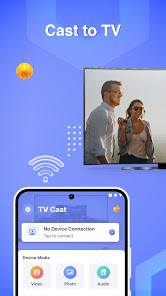
With the Cast To TV - Screen Mirroring app, you can effortlessly screen mirror your phone or tablet screen with your TV with just a tap. Enjoy the experience of watching movies, playing games, and viewing photos from your mobile device on the big screen of your TV without the hassle of complicated cables. You could cast to TV and screen share with your relatives or associates in a few easy steps.
Key Features:
● Screen Mirroring: Display content from your mobile device to your TV with a few simple steps. Airplay mirroring allows you to share your smartphone's screen with a wide TV assist with a stable transmission. Smartview on a larger screen allows you to experience your full-screen content precisely as it appears on the mobile device.
● Cast Videos: Screen cast, watch movies, video clips, and videos mirror from your favorite apps on your TV.
● Photo Slideshow: Screen share and showcase your memorable photos on the large screen of your TV.
● Game Streaming: Experience your favorite mobile games on the big screen.
● Cross-platform Support: Most smart TVs, LG, Samsung, Sony, TCL, Xiaomi, Hisense, Google Chromecast, Amazon Fire Stick & Fire TV, Roku Stick & Roku TV, AnyCast, Other DLNA Receivers, Other wireless adapters, etc
How to use Screen Mirroring app?
- Connect your phone and your TV to the same wifi network
- Open the "" Screen mirroring - cast to tv"" app and connect to Chromecast/ SamsungTV or other TV-compatible devices
- Allow your TV to connect to your phone
- After connecting successfully with the Cast to TV screen receiver, the app is now ready to use: Now, images, movies from the gallery collection, or any video you are interested in can be cast. You can use screen mirror for broadcasting on your smart TV.
Why choose Screen Mirroring - Cast To TV?
☆ Simple and user-friendly: No complex configurations are required, just a few simple steps to start screen sharing.
☆ Unlimited content: Watch any content from your mobile device on your TV.
☆ Compatibility with all devices: Supports leading TV brands and mobile devices in the market.
☆ No cable required: Free yourself from the hassle of setting up complicated cables and enjoy wireless connectivity.
☆ Record and share: Capture fantastic moments and share them with your family and friends.
You can easily connect & cast phone screen to big TV screen in high quality. Experience an excellent entertainment space right on your TV with Cast To TV - Screen Mirroring.
Rang d'utilisation de Cast To TV - Screen Mirroring
Le classement d'utilisation est basé sur l'algorithme de Similarweb qui calcule les installations actuelles et les utilisateurs actifs sur une période de 28 jours.
Toutes les catégories dans
États-Unis--
Outils dans
États-Unis#5,523
Intérêts des utilisateurs & catégories principales
Principales catégories et applications utilisées par les utilisateurs de Cast To TV - Screen Mirroring
Top des catégories
Affinité
Top des applications pour cette catégorie
Plus d'applis
14%




13%



10%




7%


Principaux concurrents & apps alternatives
Applications ayant une forte probabilité d'être utilisées par les mêmes utilisateurs, à partir du même store.

Roku Smart Home

Yubii Home

Fry’s
Cast To TV - Screen Mirroring VS. avril 27, 2026