

You’ve hit your search limit
Start your free trial to keep exploring full traffic and performance insights.
Get StartedAnalyse de l'application SMS forwarder pour le 2 avril

SMS forwarder
- GawkAr
- Google Play Store
- Gratuit
- Outils
Synchronization of devices - SMS forwarding - Incoming/Outgoing SMS to other devices
Absolutely FREE now
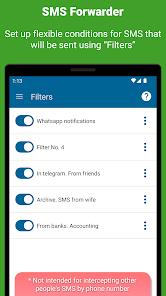
The main function of the application is synchronization of SMS with other devices via e-mail, telegram, PC, URL, sending SMS to another phone.
At the moment the application is ABSOLUTELY FREE.
Attention! The application is not designed to intercept other people's SMS, will not allow you to access the SMS of your spouse, lost phone, and so on
Brief instructions on how to get started:
Install the app and complete the initial app setup (don't skip the steps)
Register an account, confirm your e-mail and log in
In the window that appears, enter the phone number or e-mail where you want to forward your SMS
For more detailed settings, check out our help site (https://sms-forwarder.com/support/) and the application interface
What can an app do?
What kinds of messages our application can forward:
— SMS. Select whether incoming or outgoing SMS messages will be forwarded or both
— Notifications. All notifications or just some apps
— MMS (Under development and will be added in the next updates)
Where you can send messages:
— To another phone number. Forwarding is carried out through your phone, be careful, your mobile operator may charge a fee for sending SMS
— To e-mail. Several options are available for sending SMS to PC mail: via our server, via GMail API, via any SMTP server
— In Telegram. You can send SMS and other messages to private messages or group chats in telegram through our bot or your own (bypassing our server).
— In ICQ. Send messages through our server to private messages or group chats in ICQ
— In Vkontakte. Redirect messages to private messages or group conversations
— To any URL. Send message data to your personal server according to the data format. You can do anything with these messages on your server
— WeChat (Under development)
Application Features:
— Forward SMS from specific contacts/applications. You can configure from which of your contacts SMS will be forwarded or from which applications notifications will be redirected.
Set text rules. Define messages containing or not containing which words/phrases will be automatically sent
— You can set RegEx (special) rules to change the text of messages before forwarding them to a PC or elsewhere
— Roaming. Specify whether the application should work in roaming to save traffic
— Support for two SIM cards. Choose whether to send SMS from only one SIM card or from both, if they are installed in the phone
— Message templates. You can set the look that suits you how the redirected messages will look. Specify additional data such as sender number, departure time, message type and so on
— OTP. The application provides a separate option to enable/disable OTP forwarding from banks
— Password protection. You can set a password that will not allow other people to enter the application and view its settings
Is the application paid?
Free version
The application is distributed according to the freemium model. You will have access to a limited free version that allows you to create one simple filter (no advanced settings)
Trial version
All new users get a week's access to the premium version. You will not be charged at the end of this period. You decide whether to purchase a subscription or not.
Premium
At the moment, for an indefinite period, while Google Play prohibits us from receiving money for in-app sales, the premium version is available to everyone. This may change in the future.
The most important permissions required by the app
RECEIVE_SMS and READ_SMS - to access SMS/main application function
RECEIVE_WAP_PUSH - to access WAP PUSH messages
SEND_SMS - to send SMS to phone
LISTENER_NOTIFICATION - to access notifications
Rang d'utilisation de SMS forwarder
Le classement d'utilisation est basé sur l'algorithme de Similarweb qui calcule les installations actuelles et les utilisateurs actifs sur une période de 28 jours.
Toutes les catégories dans
États-Unis--
Outils dans
États-Unis--
Intérêts des utilisateurs & catégories principales
Principales catégories et applications utilisées par les utilisateurs de SMS forwarder
Top des catégories
Affinité
Top des applications pour cette catégorie
34%



32%



26%



3%

Principaux concurrents & apps alternatives
Applications ayant une forte probabilité d'être utilisées par les mêmes utilisateurs, à partir du même store.

Textra SMS

Pushbullet: SMS on PC and more

SMS Virtual - Receive SMS

Pulse SMS (Phone/Tablet/Web)
 SMS forwarder VS.
 avril 2, 2026