

You’ve hit your search limit
Start your free trial to keep exploring full traffic and performance insights.
Get StartedAnalyse de l'application NoBlueTick: No Last Read pour le 24 février

NoBlueTick: No Last Read
- Ahmed Awadallah
- Google Play Store
- Gratuit
- Outils
Are you a person who just reads messages from notification to avoid others knowing that you read their messages?
If you don’t want others to know that you are reading their messages, NoBlueTick is made for you!
Finally! No more read receipts, no check marks, no blue double tick or last seen!
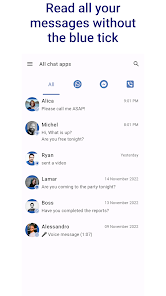
When you receive a message from a chat app, it will also be displayed in NoBlueTick. There, you can read it whenever you want, without any of your friends knowing that you have seen it.
All deleted messages from WhatsApp, Messenger, Viber etc. are saved in NoBlueTick, allowing you to secretly obtain important messages.
Don’t bother removing the internet connection or activating airplane mode anymore. NoBlueTick provides a simple yet beautiful design and makes it easy to manage your messages.
NoBlueTick does not access any encrypted files. All data is securely stored on your device.
NoBlueTick also has Chat heads that will show you unread messages in a small bubble on the screen.
This is very helpful as it gives you the ability to read messages without having to stop your current tasks.
Just tap on the bubble to open the message on NoBlueTick or drag it down to the bottom of the screen to remove it.
Features :
🔥 Hide blue double tick for WhatsApp, no last seen for Facebook Messenger, no last read for Viber
🔥 Read chat messages invisibly and incognito, without your friends knowing
🔥 All your favorite chats at one place, where you can finely sort them by app
🔥 Chat heads for quick message overview
🔥 Enable or disable NoBlueTick for different chat apps like whatsapp, viber or messenger, and be invisible for selected chats only
HOW IT WORKS
Messages are encrypted on your device so NoBlueTick can't access them directly. The only solution available is to read them from the notifications that you receive and create a message backup based on your notification history.
LIMITATIONS
Please be aware that it doesn't exist an official and supported way to read chat application messages. This is a workaround and may encounter limitations caused by the selected messaging app or even the Android OS:
1) Text messages are read via your notifications, therefore, if you have put a chat on silence, or if you are currently watching a message on the messaging app, you will not receive a notification so NoBlueTick can't save it! This also obviously means that is impossible to show notifications/messages before you downloaded this app (so download it quickly!).
2) If messages aren't being saved, it may be caused by Android killing NoBlueTick. Please remove NoBlueTick from all battery optimization services!
Other limitations may be caused by your Android version, or your system language (in particular if it is right-to-left). Please feel free to contact us and submit any problem so I can try to fix it!
༶༶༶༶༶༶༶༶༶༶༶༶༶༶༶༶༶༶༶༶༶༶༶༶༶༶༶༶༶༶༶༶༶༶༶༶༶༶༶༶
DISCLAIMER:
NoBlueTick is not affiliated with or endorsed in any way by Facebook, Messenger, WhatsApp or Viber.
All trademarks displayed on this applications are the property of their respective owners.
༶༶༶༶༶༶༶༶༶༶༶༶༶༶༶༶༶༶༶༶༶༶༶༶༶༶༶༶༶༶༶༶༶༶༶༶༶༶༶༶
Rang d'utilisation de NoBlueTick: No Last Read
Le classement d'utilisation est basé sur l'algorithme de Similarweb qui calcule les installations actuelles et les utilisateurs actifs sur une période de 28 jours.
Toutes les catégories dans
Allemagne--
Outils dans
Allemagne--
Intérêts des utilisateurs & catégories principales
Principales catégories et applications utilisées par les utilisateurs de NoBlueTick: No Last Read
Top des catégories
Affinité
Top des applications pour cette catégorie
Plus d'applis
30%




12%




9%


9%




Principaux concurrents & apps alternatives
Applications ayant une forte probabilité d'être utilisées par les mêmes utilisateurs, à partir du même store.

QmetaRam AI: Quantum Assistant

UltData: Photo & Data Recovery

Duplifix: Duplicate Photos

Sentenceify: My Text Converter
NoBlueTick: No Last Read VS. février 24, 2026