

You’ve hit your search limit
Start your free trial to keep exploring full traffic and performance insights.
Get StartedAnalyse de l'application GPS Map Camera pour le 10 avril
GPS Map Camera
- JK.Fantasy
- Google Play Store
- Gratuit
- Voyage & Local
Please watch the teach video to know how to use it.
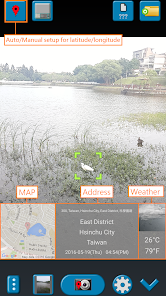
When you take a picture, this application will paste the map, address, weather and date to picture. (GPS latitude/longitude information also could be included)
This application is easy to get/set GPS location and GPS coordination for GPS Tag request.
[Quick GPS Map Camera Guideline]
When GPS Map Camera start, map/address/weather will be displayed on the camera preview. You can check the location/coordination before camera capture.
If you want to fine tune the location, manually setup the latitude and longitude also supported. (left-top button)
Support some drawing styles for map/address/weather/date. (left-top second button)
Support a variety of file-name formats to help you arrange your photos. (right-top second button)
You can change the picture save folder for help arrange photos. (right-top button)
In the camera setting page, the similar functions will be grouped with the same color.
- Camera Choice
- Flash
- Scene/Exposure/White Balance/ISO/Color Effect
- Focus Mode
- Anti-banding
- Picture Size/Picture Quality
- GPS Use/GPS picture save/Mp Type/Map Resolution/Map Zoom Scale/Map Size
- Photo Viewer
- Sound
- Prompt Dialog
The color of function string is white as default. If change to another function, the color will change to grouped color. It's better to recognize what you set.
[Others]
- Camera focus and zoom operation when preview:
Focus: use one finger to touch the screen.
Zoom: use two fingers to zoom in/out.
[Tips]
- Don't want to get MAP:
Settings -> GPS picture save -> one (original)
- Don't want to save GPS position:
Settings -> GPS Use -> disable GPS
- Don't want to popup prompt dialog:
Settings -> Prompt Dialog -> disable
【Final】
Thank you for use and watch! Hope this app is helpful for you.
Rang d'utilisation de GPS Map Camera
Le classement d'utilisation est basé sur l'algorithme de Similarweb qui calcule les installations actuelles et les utilisateurs actifs sur une période de 28 jours.
Toutes les catégories dans
États-Unis--
Voyage & Local dans
États-Unis--
Principaux concurrents & apps alternatives
Applications ayant une forte probabilité d'être utilisées par les mêmes utilisateurs, à partir du même store.

GPS Photo: With Location & Map

Timestamp Camera Pro

My Location - Track GPS & Maps

Avenza Maps: Offline Mapping
 GPS Map Camera VS.
 avril 10, 2026