

You’ve hit your search limit
Start your free trial to keep exploring full traffic and performance insights.
Get StartedAnalyse de l'application Who Use My WiFi? pour le 15 avril
Who Use My WiFi?
- MOBI Master
- Google Play Store
- Gratuit
- Outils
Are you having a problem with slow internet speed of your WiFi, there will surely be someone on your WiFi network who is connected and using it without your knowledge.
Do you want to:
1- Scan and analyze your WiFi network?
2- Get deep insight of Online, Offline, Known and Strange devices connected to your WiFi?
3- Get the list of connected devices on your WiFi network?
4- Discover, inspect and spy the strange devices on your WiFi network?
5- Get the IP address, MAC address and manufacturer of all the devices?
6- Perform a Speed Test on 2G/3G/4G/4G LTE/5G type mobile data and WiFi connection to check the Upload and Download speed?
7- Block the Strange and Unknown Devices from the Router Settings?
8- Get your WiFi Router IP and Password from the Default Router Passwords?
9- Analyze and measure the WiFi signal strength of your device?
10- Get detailed info about your WiFi connection?
11- Get info about the router that you are connected to like Frequency, Link Speed?
Solution:
Are you looking for a fastest, smartest, safest and efficient solution to overcome this problem? Here comes the perfect solution!. An intelligent solution with the simple, user friendly design and with the perfect functionality.
“Who is Connected: Smart WiFi Spy Inspector Master” is a smart and powerful network tool, that helps you in finding the devices who are connected to your WiFi connection and using it without your permission. Helps you in analyzing and measuring the WiFi signal strength of your mobile device in a beautiful and really attractive strength meter. It also provides you with the detailed info about the WiFi connection that you are connected with, identify all types of WiFi signal sharing/distributor routers like Tp-Link, Tenda, Netgear, Cisco and etc.
Features:
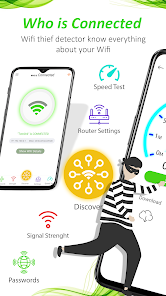
☑ Connected Devices on your WiFi: Get a deep insight and detailed report of all the Online, Offline, Known and Strange devices. Get the list of all connected devices on your WiFi connection and helps you in finding the outsiders, intruders and WiFi thieves and stealers. Get the identity of each single device that contains the IP address, MAC address and their vendor or manufacturer’s names to help you easily identify the devices.
☑ Internet Speed Test: Perform a Speed Test on 2G/3G/4G/4G LTE/5G type mobile data and WiFi connection to check the Upload and Download speed of the active connection type on your mobile device.
☑ WiFi Signal Strength Analyzer: It helps you in measuring and analyzing the WiFi signal strength of your device so that you can easily identify the reason behind your poor internet connection.
☑ Default WiFi Router Passwords: Get your WiFi router IP Address and Password from the Default Router Passwords by searching your router name like Tp-Link, Cisco, Tenda, Netgear and etc.
☑ WiFi Router Settings: Review your WiFi Router Settings to customize it like to change the SSID, Password, Bandwidth control, Block strange and unknown devices, configure your own range of IP’s to Dynamic Host Control Protocol (DHCP) and etc.
☑ WiFi Router Info: Get more detailed information about your WiFi connection like Status, Frequency, Link Speed, SSID, BSSID, Vendor, IP Address, MAC Address and etc.
☑ Safe and Secure WiFi Scanning: It scans your WiFi network safely and securely to get the list of all connected devices and the basic WiFi network info.
Supported languages:
• English (Default)
• Dutch
• Français (French)
• Deutsche (German)
• हिंदी (Hindi)
• Bahasa Indonesia (Indonesian)
• Italiano (Italian)
• Português (Portuguese)
• русский (Russian)
• Español (Spanish)
• ไทย (Thai)
• Türk (Turkish)
• Tiếng Việt (Vietnamese)
Rang d'utilisation de Who Use My WiFi?
Le classement d'utilisation est basé sur l'algorithme de Similarweb qui calcule les installations actuelles et les utilisateurs actifs sur une période de 28 jours.
Toutes les catégories dans
États-Unis--
Outils dans
États-Unis--
Principaux concurrents & apps alternatives
Applications ayant une forte probabilité d'être utilisées par les mêmes utilisateurs, à partir du même store.

YI Life

NETGEAR Orbi – WiFi System App
WiFi Detector: Who Use My WiFi

Nedis SmartLife
 Who Use My WiFi? VS.
 avril 15, 2026