

You’ve hit your search limit
Start your free trial to keep exploring full traffic and performance insights.
Get StartedAnalyse de l'application Squid: Take Notes, Markup PDFs pour le 17 avril

Squid: Take Notes, Markup PDFs
- Steadfast Innovation, LLC
- Google Play Store
- Gratuit
- Productivité
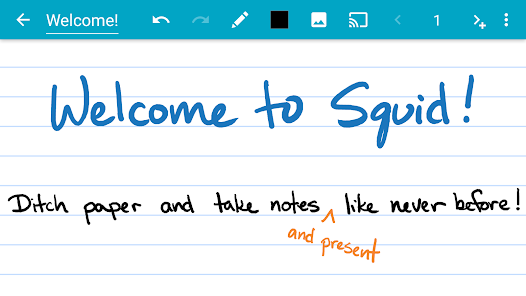
Transform your note-taking experience with Squid! For over 12 years, Squid has been a trusted app with over 12 million installs, helping users replace paper, save money, and reduce waste. Write just like you would on paper on your Android tablet, phone, or Chromebook!
✨ Key Features:
• ✍️ Natural Writing: Seamlessly write with a pen and erase with your finger on active pen enabled devices like Samsung devices with S Pen. Use your finger or capacitive stylus on other devices.
• ⚡ Low Latency Ink: Enjoy a seamless and responsive writing experience with support for low latency ink¹.
• 🔒 Private: Notes are stored on your device and are completely private. No account or sign-in required. Backup your notes to your desired location.
• 📝 PDF Markup: Easily annotate PDFs, fill out forms, edit/grade papers, and sign documents.
• 🧰 Versatile Tools: Use any color pen or highlighter, import images, draw shapes, and add typed text.
• 📁 Organize: Select, copy/paste, and move content between pages and notes. Place notes in folders to stay organized.
• 📊 Presentations: Turn your device into a virtual whiteboard and cast your notes to a TV/projector.
• 📤 Export: Export notes as PDFs, images, or Squid Note format and share or store in the cloud.
• 💰 Save: Reduce stationery costs and replace paper notebooks with Squid for eco-friendly note-taking!
🏆 Awards/Recognition:
• 🌟 Featured App and Editors' Choice in Google Play
• 📈 Category Honorable Mention for Productivity in the Samsung Galaxy Note S Pen App Challenge
• 🎉 Popular Choice Award in the Dual Screen App Challenge
👑 Squid Premium:
• Premium paper backgrounds: math, engineering, music, sports, planning, & more
• Import and markup PDFs
• Additional tools: highlighter, true eraser, shapes, text
• Backup/restore and bulk export notes as PDFs to Google Drive, Dropbox, or Box
🛠️ Base Features:
• Vector graphics engine keeps your notes beautiful at any zoom level and on any device
• Various paper backgrounds (blank, ruled, graph) and sizes (infinite, letter, A4)
• Erase entire letters or words quickly with the stroke eraser
• Undo/redo, select, move, and resize
• Change color and weight of selected items
• Cut, copy, and paste items between notes
• Two-finger scroll, pinch-to-zoom, and double tap for quick zoom
• Sort and organize notes and folders
• Import, crop, and resize images
• Export notes to PDF, PNG, JPEG, or Squid Note format
• Share notes via email, Google Drive, Evernote, etc.
• Multi-Window support (take notes while watching a video)
• Shortcuts to create new notes or open folders
• Dark theme
🎓 Google Workspace for Education customers can purchase Squid Premium in bulk at https://squidnotes.com/edu
🐞 If you encounter any bugs, please email us at help@squid.app with a description.
💡 We would love to hear your feedback or feature requests at https://idea.squidnotes.com
¹Low latency ink is available now on Chromebooks and coming soon to Android devices.
🎯 Increase your productivity and unleash your creativity with digital handwritten notes. 👉 Try Squid for FREE today!
Rang d'utilisation de Squid: Take Notes, Markup PDFs
Le classement d'utilisation est basé sur l'algorithme de Similarweb qui calcule les installations actuelles et les utilisateurs actifs sur une période de 28 jours.
Toutes les catégories dans
États-Unis#8,324
Productivité dans
États-Unis#592
Intérêts des utilisateurs & catégories principales
Principales catégories et applications utilisées par les utilisateurs de Squid: Take Notes, Markup PDFs
Top des catégories
Affinité
Top des applications pour cette catégorie
Plus d'applis
26%



10%




9%





7%




Principaux concurrents & apps alternatives
Applications ayant une forte probabilité d'être utilisées par les mêmes utilisateurs, à partir du même store.

Docusign - Upload & Sign Docs

MyScript Notes: AI Note Taking

Notepad - Notes、Todo、Memo

Notepad - Notes and Tasks
Squid: Take Notes, Markup PDFs VS. avril 17, 2026