

You’ve hit your search limit
Start your free trial to keep exploring full traffic and performance insights.
Get StartedAnalyse de l'application Basics of Autocad pour le 3 mai

Basics of Autocad
- Cards
- Google Play Store
- Gratuit
- Éducation
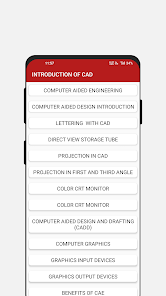
Basics of AutoCAD – Master Digital Design! Have you ever sat in a crowded engineering lab and felt like you couldn't draw a single straight line on your screen? Basics Of Autocad is built for those awkward moments when you just want to finish a 3D model without having to fumble around with a heavy physical textbook or old drafting tools.
✨ Engineering Design Features ✨:
🛠️ Basics Of Autocad for instant drafting and coordinate setups;
📐 Autocad Tutorials for mobile engineering security;
🎓 Learn Autocad for private professional development usage;
🖱️ Interactive CAD tools to block out the confusion of 3D modeling;
🖥️ Raster and Random scan display modes with customizable graphics;
💡 Transformation tools for scaling and rotation to balance visibility and speed;
📏 Detailed DDA algorithms to cover specific line and circle geometry;
🔘 Quick Boolean operations to enable solid modeling in one tap.
How to best enjoy your Autocad Tutorials! People using this software find that the comfortable read mode is very easy on the eyes. It is that simple to use the Autocad Tutorials whenever you are studying in a busy public space or preparing for a big interview.
📐 Geometric Modeling Logic:
With the Learn Autocad system, magic feels as if it can occur on your device while you adjust the Bezier curve settings. All you have to do is tap the button and let the Learn Autocad content do its magic. This helps settle those nervous feelings when you are trying to find the right projection in a crowded classroom. You get perfect results every time you open the Learn Autocad guide to protect your professional future.
🏢 Integrated CAD/CAM Power:
It even helps you with high quality drafting tools that work like a physical drafting board but for your mobile software. Using the built-in Basics Of Autocad system, you can highlight your important design phases even when you are standing in a long line at the office. Everyone using the Basics Of Autocad enjoys the fact that it covers most topics from Finite Elemental Methods to solid modeling.
🏗️ High Accuracy Mode:
The Autocad Tutorials are best shown off when you are using your device in a group at a workshop. Start your review so you can see the DDA algorithm while the person sitting nearby just sees a simple diagram on your screen. The results are often surprising for how much more comfortable you feel about your technical skills. Users love the Autocad Tutorials for their daily revision sessions to master the graphics primitives.
⚙️ Fully Custom Learning:
What differentiates this Learn Autocad tool from others is the way it allows you to access chapter-wise topics instantly. Within the Basics Of Autocad, you can find a setting that fits your specific phone hardware without any trouble. It is that little extra piece of functionality that helps the Autocad Tutorials stand out from basic search engines or messy notes.
Start Using Basics Of Autocad Today! Learning about digital design should be quick and easy for everyone in the field. This app is all about fast revisions and fun ways to manage your engineering data while you are on your phone. Enjoy the software and have fun with what the technology does for your technical curiosity. Go ahead and download it now. Experience these features on your own phone today.
-Disclaimer
All product names, logos, brands, trademarks, and registered trademarks, which are not owned by us, are the property of their respective owners.
All company, product, and service names used in this app are for identification purposes only. Use of these names, trademarks, and brands does not imply endorsement.
This app is owned by us and is not an official AutoCAD application. We are not affiliated, associated, authorized, endorsed by, or in any way officially connected with Autodesk.
Rang d'utilisation de Basics of Autocad
Le classement d'utilisation est basé sur l'algorithme de Similarweb qui calcule les installations actuelles et les utilisateurs actifs sur une période de 28 jours.
Toutes les catégories dans
États-Unis--
Éducation dans
États-Unis--
Principaux concurrents & apps alternatives
Applications ayant une forte probabilité d'être utilisées par les mêmes utilisateurs, à partir du même store.

NEC Electrician Exam Prep 2026

magicplan

AI Home Design: Ideal House

DesignEvo - Logo Maker
 Basics of Autocad VS.
 mai 3, 2026