

You’ve hit your search limit
Start your free trial to keep exploring full traffic and performance insights.
Get StartedAnalyse de l'application ioBroker.vis pour le 23 avril

ioBroker.vis
- Denis Haev
- Google Play Store
- Gratuit
- Outils
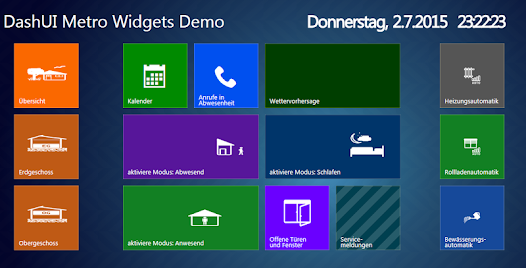
WEB visualisation for ioBroker platform as android App.
This app is designed to run on mobile phones and tables. it stores the vis project and all images on the mobile phone to save the mobile traffic.
Usage
This app required the installed and running web adapter or socket-io adapter and installed vis adapter. If web server is activated, so internal socket-io interface must be activated.
In vis some project should exists, e.g. "main".
The ports and the ioBroker server must be reachable from mobile phone.
To show settings press semi-transparent button with "..." in the top left corner.
Settings
Almost all settings are optional except "WIFI Socket" and "Project".
Buttons
- Reload - Just restart the web engine, like you press the "Refresh" button in your browser.
- Re-sync - If some changes were made on the vis project, it will be **not** automatically loaded into app. To do that the "Re-sync" button must be pressed. All project files and images will be loaded anew on the phone. It is done to save the mobile traffic and to speed up the start of application. Because read from internal SD-Card is much faster than from ioBroker server.
- Ok - save all changes and restart the engine. No synchronisation will be done if the project was yet defined. To load changes from ioBroker vis project use "Re-sync" button.
- Cancel - discard all changes and close dialog.
Connectivity
App can detect via SSID name if the mobile phone in the home (trusted) network or outside of home network and use for home and outside connection the different socket URLs and login data.
Normally in the home network there is no authentication and connection is via HTTP (unsecure) but from outside network the connection goes via https (secure) and with login/password.
- Connected - shows if the app is connected with ioBroker server.
- WIFI SSID - name or names (divided by comma) of home SSID to use home credentials for authentication and home URL for connection.
- WIFI Socket - URL like ```http://192.168.0.5:8082```. It is important to have http or https at the start, so app can distinguish between secure and insecure connections. Port is important too. Normally 8082 for *web* or *8084* for separated socketio.
- WIFI User - if for the socket communication the authentication is enabled, write here user name from iobroker. User must be first created via "admin" interface. The user "admin" exists always and cannot be deleted.
- WIFI Password - user password as set in the ioBroker
- WIFI Password repeat - repeat user password here
Project name and settings language
- Language - language of the settings dialog. English, german and russian languages are supported. To activate changes press *OK* button.
- Project - project name from ioBroker. If no project name shown, so there is no connection with iobroker or no one project is exist.
The full description can be found on the iobroker.net http://www.iobroker.net/?page_id=5029&lang=en
Rang d'utilisation de ioBroker.vis
Le classement d'utilisation est basé sur l'algorithme de Similarweb qui calcule les installations actuelles et les utilisateurs actifs sur une période de 28 jours.
Toutes les catégories dans
États-Unis--
Outils dans
États-Unis--
Principaux concurrents & apps alternatives
Applications ayant une forte probabilité d'être utilisées par les mêmes utilisateurs, à partir du même store.

RAFA - AI Investment Agents

M1: Invest & Bank Smarter

Power E*TRADE Advanced Trading

EFE
 ioBroker.vis VS.
 avril 23, 2026