

You’ve hit your search limit
Start your free trial to keep exploring full traffic and performance insights.
Get StartedAnalyse de l'application Satellite Director pour le 3 mai

Satellite Director
- Zekitez
- Google Play Store
- Gratuit
- Outils
Finding a TV satellite or an antenna, in azimuth, can be pretty difficult. Before you can find it with a compass you have to do some calculations using your GPS location, magnetic variation, compass azimuth and satellite position.
Satellite Director replaces all of that. See tips to success below.
Access to sensor data (GPS location and compass) is required to calculate the position of the satellite in the sky.
Access to internal/external storage is required to store a screenshot or to store a changed list of satellites (you can delete/add/change satellites).
Access to a camera is required to imitate a 'look through view' or 'mirror effect' which allows to align the satellite dish (lnb arm) with the displayed arrow.
Satellite Director does not collect or share any personal or non-personal data. Satellite Director does not use any form of advertising.
Português: Telefones sem bússola não pode baixar este aplicativo.
WARNING: YOUR PHONE or TABLET MUST HAVE A COMPASS !!!!
WITHOUT COMPASS YOU CANNOT DOWNLOAD THIS APP.
Check "Satellite Locator" which uses GPS locations to find a satellite.
Some phone/tablet compass are really bad so compare your phone/tablet compass with a real compass !!
Unfortunately you have to calibrate the compass before using it.
Metal covers/cases or covers/cases with metal/magnetic closure will influence/disrupt the compass of your phone or tablet. Do not use these covers !! The compass of your phone can also get inaccurate because it is affected by other electro - magnetic fields, iron or because it is weakened by age. Calibrating the compass may not help anymore.
PRECISION DEPENDS ON THE QUALITY OF YOUR PHONES HARDWARE.
Warning: If you use Cyanogenmod / Cymod then you may run into Android compatibility issues and the app may not work. You should then complain to Cyanogenmod / Cymod and not to me.
This app is add-free !
Help me to continue the work on this app and watch some of my videos on Youtube. The advertising in the videos provides some required money (houres of work, phones to test on, satellite equipment, etc.).
How does it work ?
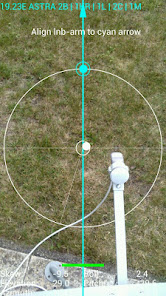
Just enable the GPS in your phone or enter your GPS location, select the desired TV satellite or antenna location and point your phone to the sky to target (find) the TV satellite. You have found the satellite when the white ball is in the white circle and the cyan ball is in the cyan circle. Align, in azimuth, the offset arm of the satellite dish to the cyan arrow on the phones display and the satellite dish is aligned in azimuth with the satellite.
Selectable audio tone, camera preview, continuous mode (no pause), color pickers or a user defined satellite position may make it easier for you to find the desired TV satellite. The satellite list contains 280 satellites.
Optional you can take a photo (resized)/screenshot by touching on the director tab. The photo/screenshot is ONLY stored on the phones memory card.
Optional: you can get an indication when you are to close to iron (dish/pole) in the form of an green/yellow/red bar.
Satellite positions are derived from Agi's database. Some positions may seem not accurate (example: Hispasat 30°w is at 29.96°w in the satellite list) but they are very accurate.
New phones with Android 4: in case of a wrong compass reading the "Settings" screen has options to correct the compass readings !!!!
Previous versions are available from my website.
If you have any questions, requests or problems PLEASE write an email.
All language translations by Google Translator.
3 tips to success:
1- do NOT go to close to the iron dish, iron lnb arm or iron pole (keep at least 30 cm distance)
2- calibrate the compass of the phone by waving it in a figure 8 before you start
3- optional: calibrate the compass of the phone by rolling your phone along its length axis about 2-3 turns (works on some phones)
Rang d'utilisation de Satellite Director
Le classement d'utilisation est basé sur l'algorithme de Similarweb qui calcule les installations actuelles et les utilisateurs actifs sur une période de 28 jours.
Toutes les catégories dans
Allemagne--
Outils dans
Allemagne--
Intérêts des utilisateurs & catégories principales
Principales catégories et applications utilisées par les utilisateurs de Satellite Director
Top des catégories
Affinité
Top des applications pour cette catégorie
Plus d'applis
24%





14%





14%


14%


Principaux concurrents & apps alternatives
Applications ayant une forte probabilité d'être utilisées par les mêmes utilisateurs, à partir du même store.

Offline Map Navigation

phyphox

Linksys
NetShare - no-root-tethering
Satellite Director VS. mai 3, 2026